GradingPad
Educational AI Tools
GradingPad is a fast, tactile, zero-login grading calculator that helps K-12 teachers convert missed answers into percentages, letters, and half-point accuracy.
Promoted
 AI Checker PlusAI detector that highlights which passages AI wrote. Free check, no sign-up. Plagiarism too.
 RewindType any X/Twitter handle. Get their year back as a narrated video story. Then ask it anything.
 KurodyneSell the tools from your AI side projects. Listing is free.
 Pixmax.aiPixmax.ai is an all-in-one AI workspace for videos, visual stories, and marketing content.
 SEOify - Improve your SEO & rankingsBuild links to rank in Google. Improve your DR with links you can start building now.Advertise here330,000+ people visit Dang.ai every month.
What does GradingPad do?
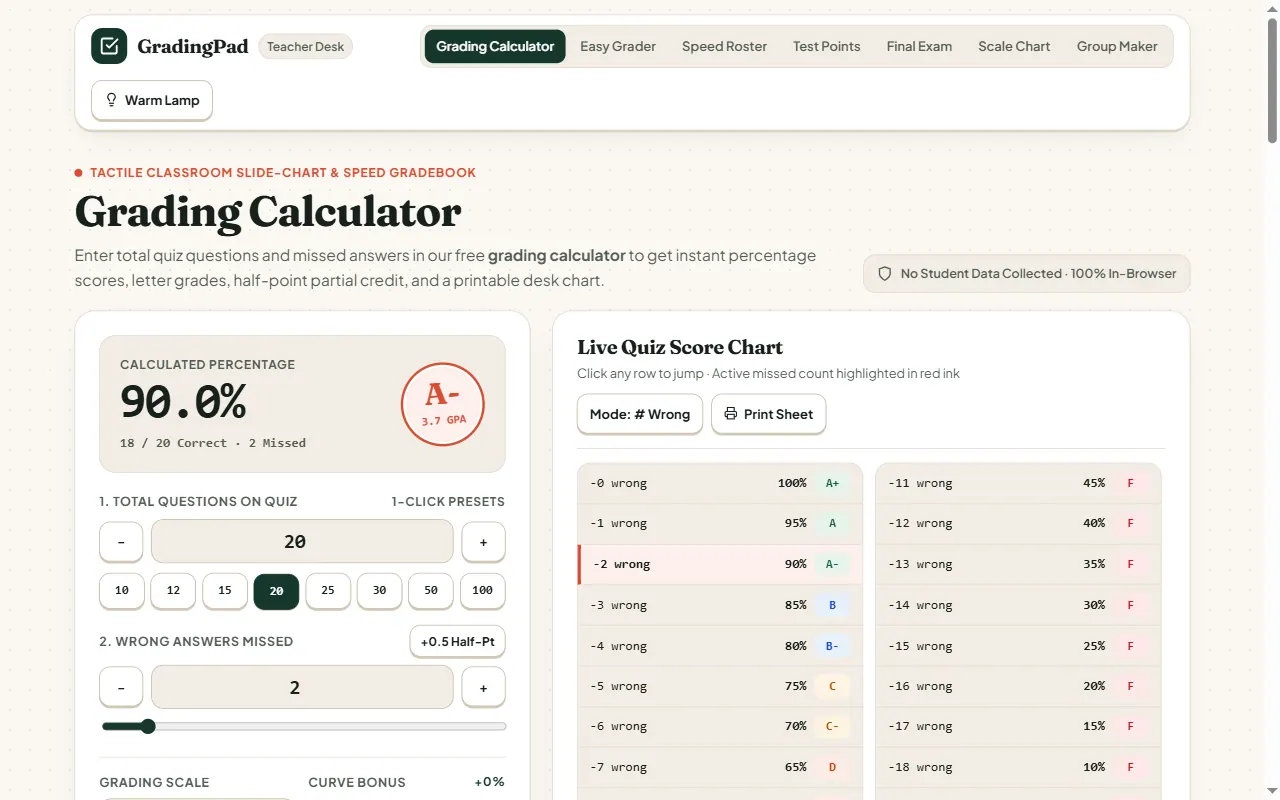
GradingPad is a classroom grading utility built for quick, tactile desk use. It replaces worn slide charts with an instant “Easy Grader” that converts total quiz questions and missed answers into an exact percentage, letter grade, and an easy-to-read printable score chart.
Use it for standard grading, including 0.5 half-point partial credit. You can mark with a simple “# Wrong” input or award partial credit using a +0.5 option, then switch between grading scale views like a standard 10-point scale and a strict 7-point scale. Optional curve bonus support lets you adjust outcomes while keeping the lookup table aligned.
For longer assessments, GradingPad supports desk-printable charts tailored to common question counts (with presets and quick jumping by row). You can also log or track scores using built-in options like roster CSV/export and class summary calculations.
GradingPad is intended for K-12 teachers and classroom support roles who want fast grade lookups with no student data entry and privacy-first, in-browser computation. Pricing and paid plans aren’t listed in the provided materials, so plan details are not included here.
How do I calculate a quiz percentage in GradingPad?
Enter the total number of questions and the number of missed answers, and the grader computes the percentage plus the matching letter grade. You can also apply an optional curve bonus if needed.
Can I award half-point partial credit (0.5) with GradingPad?
Yes. GradingPad supports 0.5 half-point handling so you can reflect partial credit without doing separate calculations.
What’s the difference between “# Wrong” and “# Correct” modes?
In “# Wrong” mode you enter how many items were missed. In the other display mode, you work from correct counts—use whichever matches how you’re recording student work.
Can I print a desk chart for a specific number of questions?
Yes. GradingPad provides printable desk charts and supports multiple preset question counts, so you can print a clean reference for common quiz sizes.
Does GradingPad collect student data?
GradingPad performs scoring calculations in your browser and does not collect student personally identifiable information. It’s designed to keep score entry local.
When should I use a final grade calculator instead of the quiz grading calculator?
Use the quiz grading calculator for quick percentage and letter grade results from a single assessment. Use the final/weighted grade tools when you need to determine exam scores needed to reach a target grade based on final grading plans.
This listing is claimed
Own GradingPad? Sign in with the email used to claim it to manage this listing, or upgrade to Pro for featured-first placement and a newsletter feature.