
audiotranscription.io
AI Transcription Software Tools
Upload audio or video to get an editable, timestamped transcript in seconds—export it in common text, doc, and subtitle formats.
- Pricing
- Free
- Category
- Transcription
- Listed
- Aug 21, 2026
- Updated
- Aug 21, 2026
Promoted
 Sidrune AI85% off. Stable Claude API for agent developers. Pay as you go. Invoices & refunds available.
 Pixmax.aiPixmax.ai is an all-in-one AI workspace for videos, visual stories, and marketing content.
 SEOify - Improve your SEO & rankingsBuild links to rank in Google. Improve your DR with links you can start building now.Advertise here270,000+ people visit Dang.ai every month.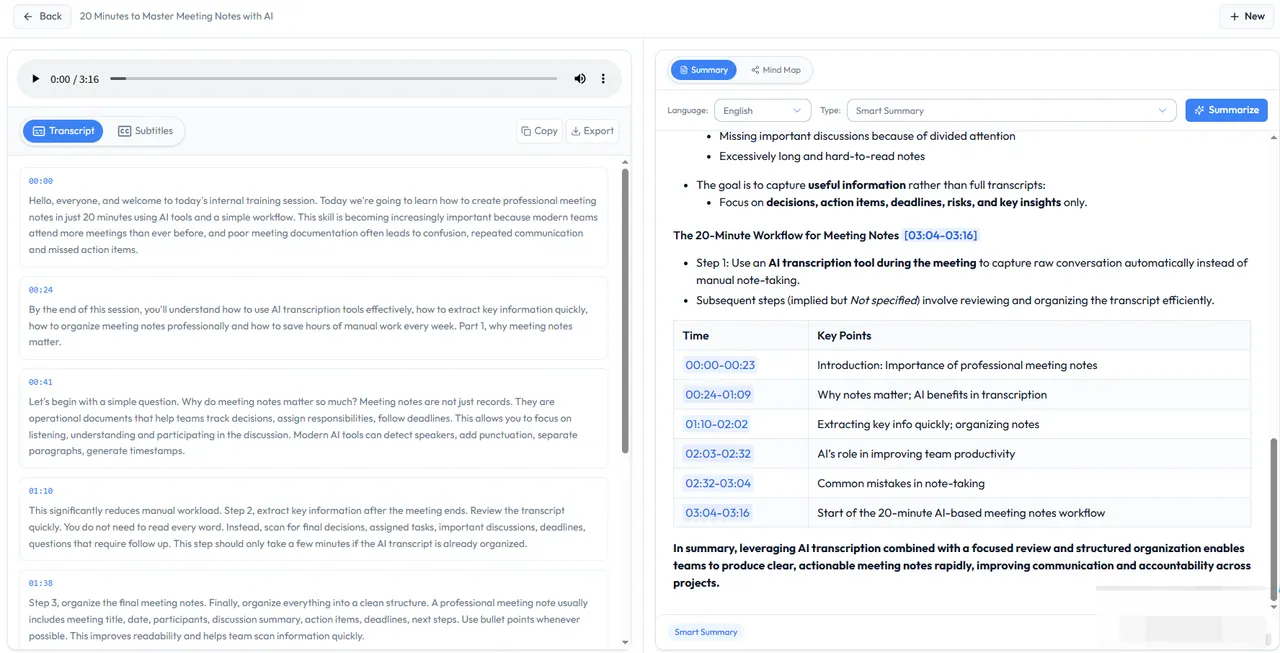
What does audiotranscription.io do?
AudioTranscription.io turns spoken audio or video into searchable text using AI, with timestamps for quick navigation. Upload a file (up to 500 MB) or paste a link, then review the transcript in an interactive editor.
The transcription supports both audio and video sources and produces structured output designed for real-world use. You can click to play the original audio alongside the text, correct misheard terms, adjust speaker labels, and split or refine segments as needed.
When you’re ready, export your transcript in formats like TXT, DOCX, JSON, SRT, and VTT. Processing is secured end-to-end with end-to-end encryption, and uploads are handled for transcription without being shared with third parties.
What file types can I transcribe with AudioTranscription.io?
Upload MP3, WAV, M4A, MP4, MOV, or WEBM files. The tool also supports pasting a link for transcription.
What’s the maximum upload size?
The maximum file size is 500 MB.
Can I edit the transcript after it’s generated?
Yes. The transcript is editable in the interactive editor, and you can click timestamps to hear the original audio and fix mistakes.
How fast does transcription take?
Typical turnaround is fast—for example, the site highlights ~30 seconds for an average-length recording, and a 30-minute file is typically transcribed in under about 60 seconds.
What export formats are available?
You can export in TXT, SRT, VTT, DOCX, and JSON formats.
Is my recording handled securely?
Transcription uses end-to-end encrypted processing, and uploaded files are processed for transcription and deleted immediately after.
This listing is claimed
Own audiotranscription.io? Sign in with the email used to claim it to manage this listing, or upgrade to Pro for featured-first placement and a newsletter feature.