
Side Space
Verified
AI Productivity Tool
Your AI-Powered Vertical Tabs Manager for browsing
- Pricing
- Freemium
- Category
- Productivity
- Listed
- May 27, 2025
- Updated
- May 25, 2026
Promoted
 Sidrune AI85% off. Stable Claude API for agent developers. Pay as you go. Invoices & refunds available.
 Pixmax.aiPixmax.ai is an all-in-one AI workspace for videos, visual stories, and marketing content.
 SEOify - Improve your SEO & rankingsBuild links to rank in Google. Improve your DR with links you can start building now.Advertise here270,000+ people visit Dang.ai every month.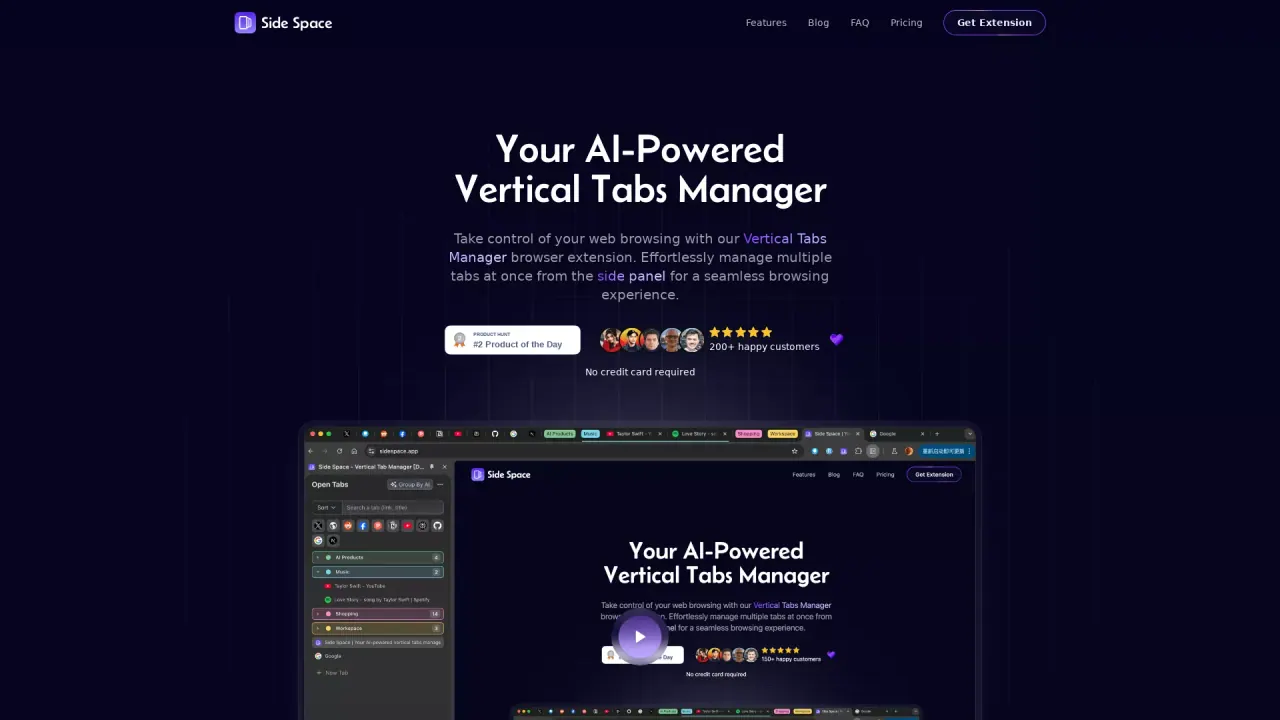
What does Side Space do?
How does AI-powered tab grouping work in Side Space?
Side Copilot uses AI to automatically organize and cluster your open tabs based on their content. You can customize the groupings with Group Guard, a feature that auto-detects and groups tabs by custom categories using URL patterns.
What are the benefits of the Vertical Tabs Manager in Side Space?
The Vertical Tabs Manager keeps your browser tabs organized in a side panel and splits them into Spaces (e.g., Workspace, Social Media, Shopping, Personal, Study). It includes AI-powered tab grouping, space switching, cross-device syncing, and the ability to suspend and restore tabs for smoother workflow.
Is the Side Space extension available for free and what features are included?
Yes, there is a free version. You can create up to 5 spaces to manage your tabs, enable cloud sync, access Chat Mode, enjoy unlimited AI chat with the current page, receive basic support, and get free updates for life. The free plan also features an Arc Browser–like vertical tab layout.
How do Spaces and cloud sync work across devices?
Side Copilot automatically saves spaces, and you can sync them across multiple browsers and devices by logging into your account. This keeps your Spaces up to date wherever you browse.
Which browsers are supported and can the side panel be placed on the left?
Side Copilot is available as an extension for Chrome, Brave, Edge, Dia, Comet, Vivaldi, Sigma, Firefox, and Zen. The side panel can be placed on the left in supported browsers (for example, Edge and some Chromium-based browsers), providing flexible layout options.
What is BYOK and why would I use it?
BYOK stands for Bring Your Own Key. It provides a way to access AI models from providers using your own key, enabling more customized or enterprise-grade AI integrations.
What is the difference between Side Copilot Chat Mode and Agent Mode?
Chat Mode lets you interact with your open tabs through natural language to get help and answers about your browsing context. Agent Mode provides autonomous AI that can automate tab tasks, such as organizing tabs, managing windows, researching topics, and other workflow automations.
What actions can Side Copilot automate or perform?
In addition to chat-based help, you can use shortcuts and automation to group tabs, search across tabs, restore recently closed tabs/windows, arrange windows (grid or cascade), take screenshots, and more. Shortcuts include actions like Group Tabs, Quick Search, Take a Screenshot, Research Topic, Restore Recently Closed Tabs/Windows, and both page-level explain or analyze actions.
How can I save or restore tab groups within a space?
You can easily Save/Restore Tab Groups within a space, so you don’t lose your tab workflows and can quickly recreate a productive setup.
Can I copy all URLs from a space, and in what formats?
Yes. You can copy all URLs of the tabs in a space to your clipboard in multiple formats, including markdown, text, and JSON.
How do I manage spaces (rename, theme, order, delete, and more)?
Space Management lets you rename spaces, customize themes, reorder them, delete spaces, and perform other organizational adjustments to keep your workspace tidy.
What is the refund policy for Side Space purchases?
Each new purchase includes a 7-day money-back guarantee, so you can request a refund within seven days if the product doesn’t meet your needs.
Do I need to sign in, and why?
Signing in enables cloud sync of your Spaces across devices, so your setup stays consistent as you switch between machines and browsers. It also unlocks access to AI features and premium capabilities tied to your account.
This listing is claimed
Own Side Space? Sign in with the email used to claim it to manage this listing, or upgrade to Pro for featured-first placement and a newsletter feature.