
AIJewelryModel
AI Jewelry Marketing
Turn your jewelry product photos into realistic model try-on images and short videos for listings and ads—without a photoshoot.
- Pricing
- Paid
- Category
- Productivity
- Listed
- Apr 28, 2026
- Updated
- Oct 19, 2026
Promoted
 Pixmax.aiPixmax.ai is an all-in-one AI workspace for videos, visual stories, and marketing content.
 RewindType any X/Twitter handle. Get their year back as a narrated video story. Then ask it anything.
 KurodyneSell the tools from your AI side projects. Listing is free.
 Sidrune AI85% off. Stable Claude API for agent developers. Pay as you go. Invoices & refunds available.
 SEOify - Improve your SEO & rankingsBuild links to rank in Google. Improve your DR with links you can start building now.Advertise here270,000+ people visit Dang.ai every month.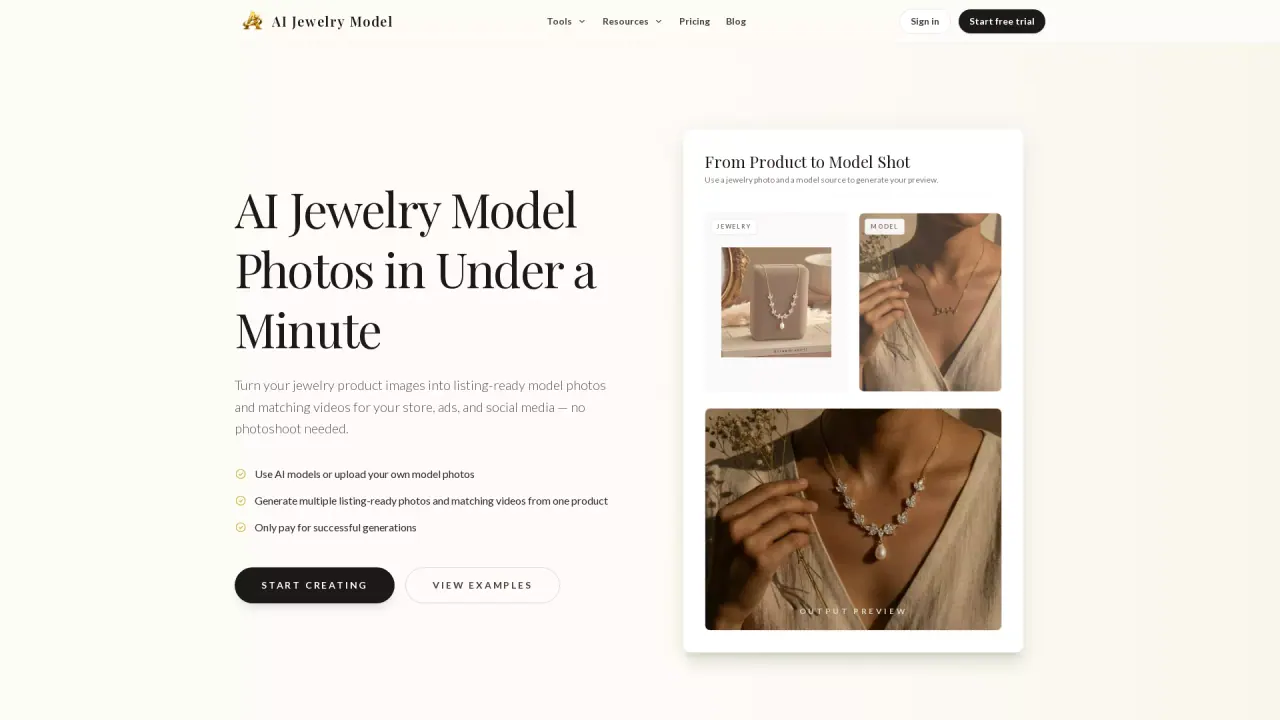
What does AIJewelryModel do?
AI Jewelry Model creates listing-ready jewelry model photos and matching videos from your existing product images. Start with a clear jewelry photo, choose a model and output settings, and generate a coordinated set of visuals you can use for your store, ads, and social media.
The core workflow is designed around complete listing packs: generate a 6-image jewelry gallery from one product photo, including a listing hero image, close try-on, scale/fit reference, detailed material close-up, a second product angle, and a lifestyle gift scene. You can also generate multiple try-on variations from a single generated try-on image for different layouts and selling needs.
In addition to photos, you can turn generated visuals into short videos for product storytelling, paid ads, and social content. This helps you add motion to your jewelry creatives without booking new shoots.
AI Jewelry Model is for jewelry sellers, Etsy/Shopify merchants, ecommerce teams, and brands that want to refresh product imagery faster and reduce photoshoot costs. Plans range from a free option with monthly credits to paid tiers (Starter, Pro, Studio) that increase monthly credits, output limits, and include features like non-watermarked downloads and listing video generation.
What does AI Jewelry Model generate from my photos?
You upload a jewelry product photo and generate realistic model try-on visuals, including a coordinated 6-image listing pack, plus matching short videos where available by plan.
Can I create a full listing image pack from one product photo?
Yes. You can create a complete 6-image jewelry listing pack from a single product image, covering hero, try-on, scale/fit, detail proof, a second angle, and a lifestyle scene.
Do I need a photoshoot or a physical model to use the tool?
No. The workflow is built to turn your product images into model-style photos without booking a traditional photoshoot.
Does the tool charge me for failed generations?
No. Failed generations are not charged.
What types of jewelry are supported?
Rings, necklaces, earrings, and bracelets are supported for both listing photo generation and try-on style visuals.
How do plans and credits work?
You receive monthly credits depending on the plan (including a free option). Credits are used to generate outputs like single try-on images and complete 6-image packs; higher tiers increase monthly credits, output limits, and video generation options.
This listing is claimed
Own AIJewelryModel? Sign in with the email used to claim it to manage this listing, or upgrade to Pro for featured-first placement and a newsletter feature.