
AI Clothes Changer
AI Productivity Tools
AI Clothes Changer lets you swap outfits in a photo using two uploads—your portrait and a garment reference.
- Category
- Productivity
- Listed
- Nov 5, 2026
- Updated
- Nov 5, 2026
Promoted
 AI Checker PlusAI detector that highlights which passages AI wrote. Free check, no sign-up. Plagiarism too.
 RewindType any X/Twitter handle. Get their year back as a narrated video story. Then ask it anything.
 KurodyneSell the tools from your AI side projects. Listing is free.
 Sidrune AI85% off. Stable Claude API for agent developers. Pay as you go. Invoices & refunds available.
 Pixmax.aiPixmax.ai is an all-in-one AI workspace for videos, visual stories, and marketing content.
 SEOify - Improve your SEO & rankingsBuild links to rank in Google. Improve your DR with links you can start building now.Advertise here270,000+ people visit Dang.ai every month.
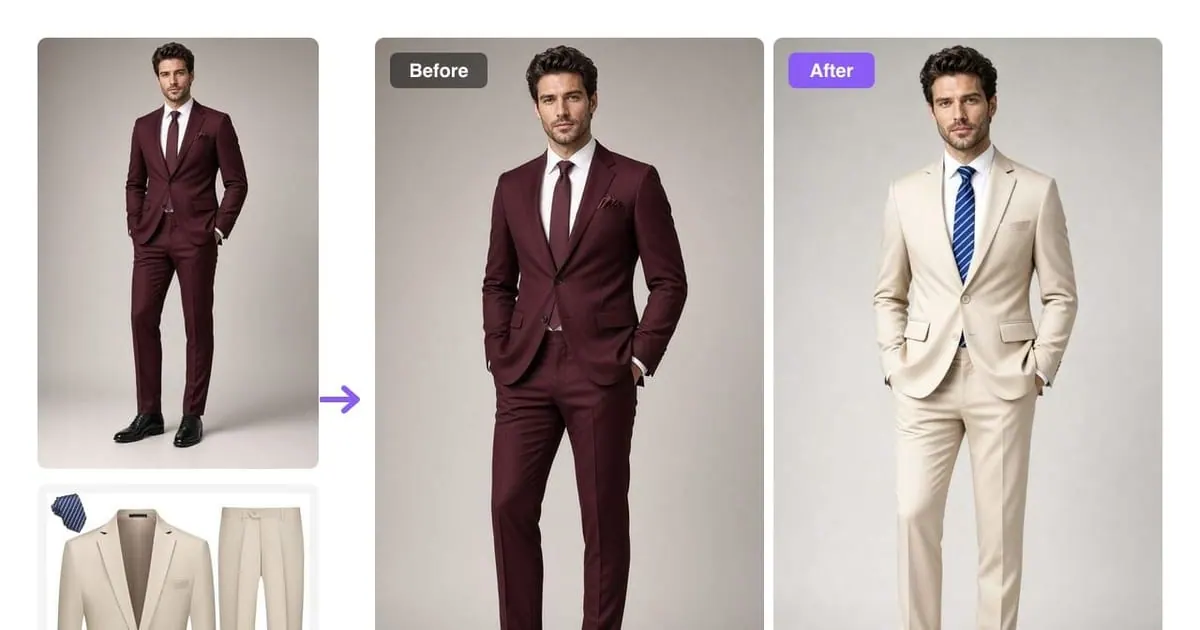
What does AI Clothes Changer do?
AI Clothes Changer is a browser-based AI clothes changer and virtual try-on studio built for photo-real outfit swaps. Upload a clear portrait of a person plus a garment reference (a product shot, flat-lay, or full-look image), and the tool rebuilds the clothing on the same person in the same scene lighting.
The editor is designed to preserve the person and the original setup while changing clothing only. It aims to keep the face, pose, and body proportions consistent, while matching fabric drape and how garments fold at collars, shoulders, sleeves, and other details. Small accessories, footwear, and fine elements may vary, so it’s recommended to review results at full size before saving or sharing.
Choose a mode based on how you want to work: Preview for quick look checks, Studio for up to four variations in one go, or Pro for prompt-controlled generations when you want written direction. It also supports generating a full coordinated set from one garment reference—useful for comparing whole looks like a jacket-and-trousers combination.
AI Clothes Changer is designed for independent stylists, online sellers, fashion brands, and content creators, and it runs directly in your browser on desktop and mobile. Pricing is available via memberships (Starter, Plus, Pro) or free trials with Google sign-up credits; preview, studio, and pro usage are handled through credits and downloads are available after generation.
What do I need to use AI Clothes Changer?
Upload two reference images: a portrait of one person (face the camera for the best fit) and a garment reference (a flat-lay or product photo works). Then choose a mode and generate.
Can I swap a full outfit in one generation?
Yes—using one garment reference, you can preview a coordinated set at once (for example, jacket, trousers, and tie). Review the result for fit, body proportions, and any small detail changes.
Does it preserve the person and photo lighting?
The editor is designed to replace clothing while preserving the person and scene, including facial features, body proportions, and the original pose. Lighting and how the garment drapes are matched to the source photo.
Is AI Clothes Changer free, and how do credits work?
It’s free to try with 20 credits at Google sign-up (no card required). Preview costs 10 credits for one image, Studio costs 20 credits for up to four variations, and Pro is also 20 credits per prompt-guided image.
What’s the difference between Preview, Studio, and Pro?
Preview uses a garment reference only for 1 image. Studio uses a garment reference to generate 1–4 variations at the same credit price for sharper detail. Pro is prompt-guided, using both the garment reference and written direction.
Can I use the generated images commercially?
Yes—each membership plan includes a commercial use license. Pricing plans are Starter, Plus, and Pro, and you can choose based on your monthly credit allowance.
This listing is claimed
Own AI Clothes Changer? Sign in with the email used to claim it to manage this listing, or upgrade to Pro for featured-first placement and a newsletter feature.