AI Chat Folders
AI Productivity Tools
Organize AI chats with nested folders, pins, search, and exports in a Chrome extension for Gemini, ChatGPT, Claude, and more.
- Pricing
- Freemium
- Category
- Productivity
- Listed
- Nov 13, 2026
- Updated
- Nov 13, 2026
Promoted
 AI Checker PlusAI detector that highlights which passages AI wrote. Free check, no sign-up. Plagiarism too.
 RewindType any X/Twitter handle. Get their year back as a narrated video story. Then ask it anything.
 KurodyneSell the tools from your AI side projects. Listing is free.
 Pixmax.aiPixmax.ai is an all-in-one AI workspace for videos, visual stories, and marketing content.
 SEOify - Improve your SEO & rankingsBuild links to rank in Google. Improve your DR with links you can start building now.Advertise here330,000+ people visit Dang.ai every month.
What does AI Chat Folders do?
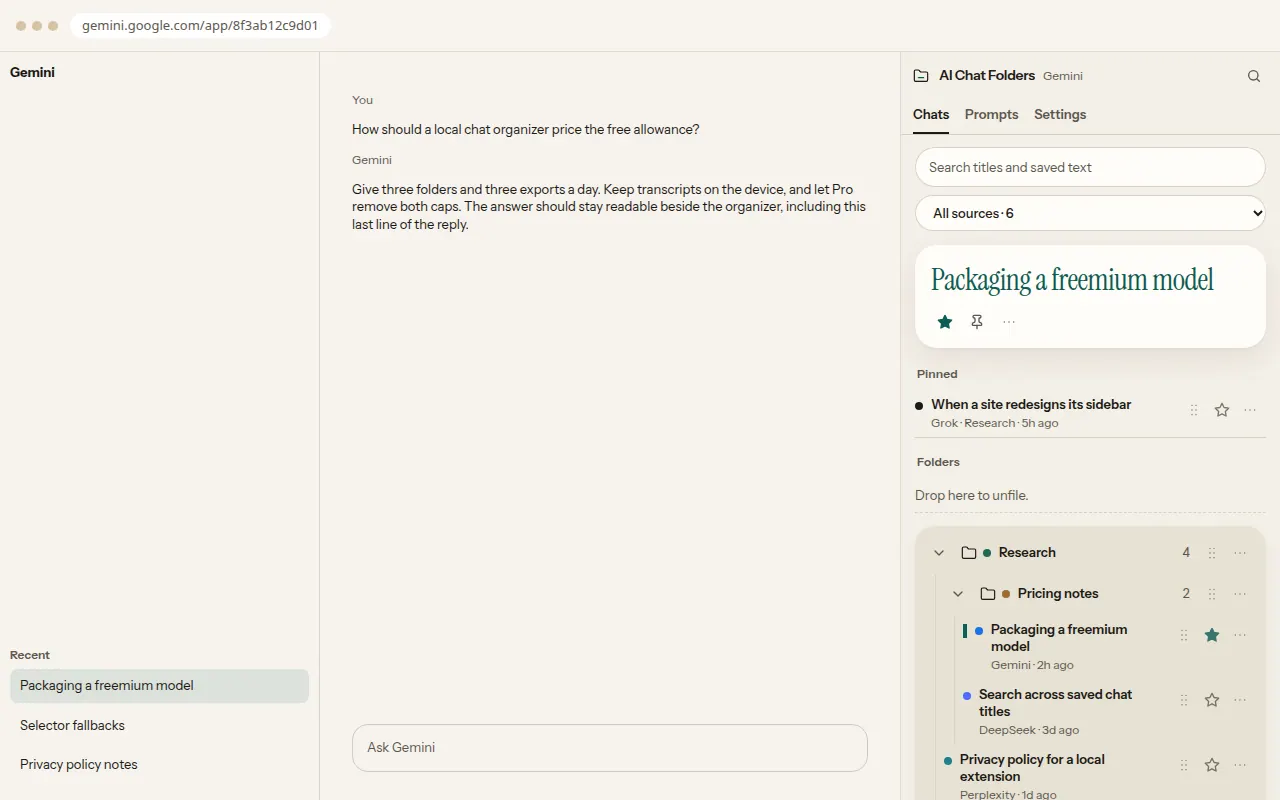
AI Chat Folders is a Chrome extension that brings an organizer to your everyday AI chat apps, so your history doesn’t become one endless list. It adds nested folders, pins and stars, fast search, and export tools right beside the chat experience.
You can drag chats into folders to keep Active, Reference, and Scratch where you expect them. Pin the thread you’re working on today, and star the conversations you’ll want again later—without forcing them to float above everything. A built-in search and command palette helps you find chats by title and by the text you’ve opened.
When it’s time to save work outside the browser, AI Chat Folders supports export to Markdown, plain text, or PDF (and copy). It also includes a prompt library so you can store reusable prompts and insert them into the composer on supported sites.
All folder structure and transcript data stay local in your browser. You can start free, with 3 folders and 3 exports per day. Pro is $4.99/month or $39/year, and removes the folder and export limits. It works with Gemini, Grok, Perplexity, DeepSeek, ChatGPT, and Claude.
Which AI chat apps does AI Chat Folders work with?
It supports Gemini, Grok, Perplexity, DeepSeek, ChatGPT, and Claude.
Do my chats get uploaded to an account for organization or export?
No—folders and saved transcripts stay in your browser. Pro restores license access using your email and a 6-digit code, but chat text isn’t uploaded for organizing or export.
How does exporting work, and what formats are available?
You can export chats as Markdown, plain text, or PDF (or copy). Free includes 3 exports per day; if the transcript isn’t local yet, open the chat once so export can use it.
What’s included in the Free plan?
Free includes 3 folders and 3 exports per day, plus search, pins, stars, and the prompt library.
How much is Pro and what limits does it change?
Pro is $4.99/month or $39/year. It removes the Free caps for unlimited folders and unlimited exports.
How do I restore my Pro subscription if I already paid?
Open Settings or the upgrade sheet (or the toolbar popup) and choose “Already paid? Restore purchase.” Enter your checkout email, then use the 6-digit code sent to you; typing the email alone won’t enable Pro.
This listing is claimed
Own AI Chat Folders? Sign in with the email used to claim it to manage this listing, or upgrade to Pro for featured-first placement and a newsletter feature.