
wraploom
AI Auto Image Tools
Design Tesla Paint Shop wraps with AI, preview them in live 3D, and export ready-to-install PNGs for your Model 3, Model Y, Model S, Model X, or Cybertruck.
Promoted
 Pixmax.aiPixmax.ai is an all-in-one AI workspace for videos, visual stories, and marketing content.
 AI Checker PlusAI detector that highlights which passages AI wrote. Free check, no sign-up. Plagiarism too.
 RewindType any X/Twitter handle. Get their year back as a narrated video story. Then ask it anything.
 KurodyneSell the tools from your AI side projects. Listing is free.
 SEOify - Improve your SEO & rankingsBuild links to rank in Google. Improve your DR with links you can start building now.Advertise here330,000+ people visit Dang.ai every month.
What does wraploom do?
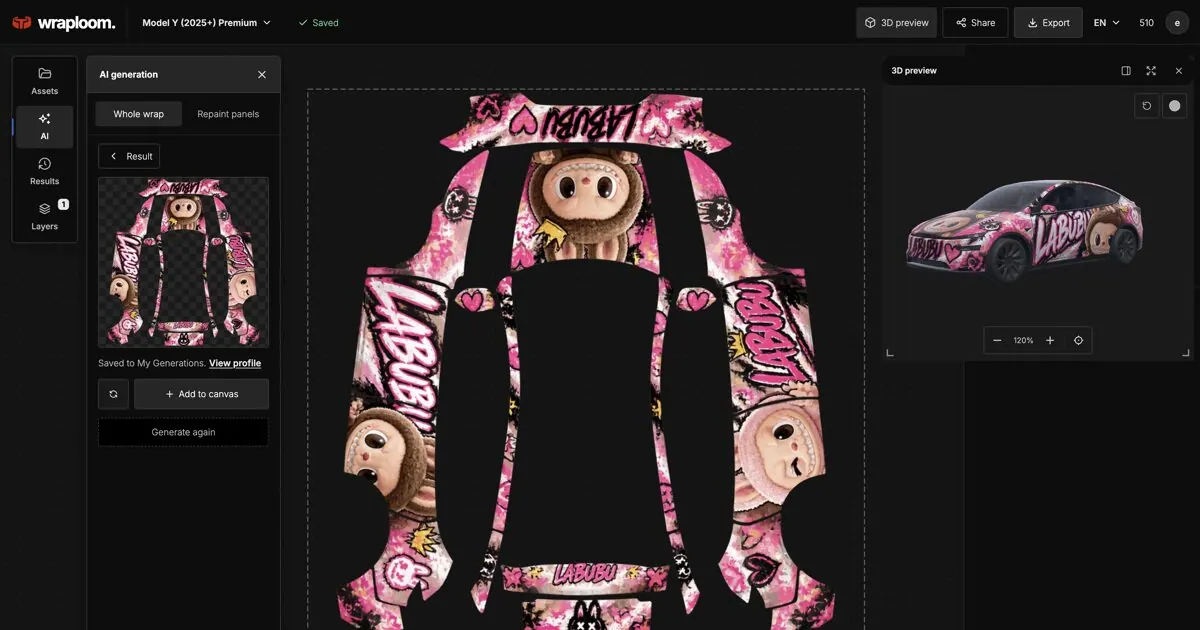
WrapLoom is a browser-based wrap studio for Tesla owners who want a custom look without vinyl. Create a wrap by describing it in plain language—like “matte black with a red racing stripe”—or start from a photo and let AI translate colors and style into a design. You can also begin with a blank canvas and build your wrap directly on the 2D template.
The workflow is designed for accuracy. After generation, you can edit the wrap in a 2D editor while simultaneously seeing a live 3D preview on your selected Tesla model. Your changes stay in sync across 2D and 3D, so there’s less guesswork as you refine details like stripes, patterns, text, and artwork. If you’re unhappy with part of the design, you can select a panel and have AI repaint just that section while leaving the rest untouched.
When your wrap is ready, export downloads are handled for Paint Shop compatibility. Exports are PNG files automatically cropped to the official template and compressed to the limits Paint Shop expects (including an export size under 1 MB and resolution matched to the model template). WrapLoom also offers license plate backgrounds, including ready-made options and AI-generated plates to match your wrap.
Editing, previewing, and exporting are free. Credits are used for AI generations: new accounts get 10 free credits, credits never expire, and there’s no charge of credits if a generation fails. Wrap generation pricing is available with Starter ($4.90 for 80 credits), Creator ($9.90 for 220 credits), and Pro ($19.90 for 550 credits), and credits are used only for AI generations.
What can WrapLoom generate for a Tesla Paint Shop wrap?
You can generate full wraps by describing colors, style, and patterns, or by using a photo to create a wrap. You can also start from a blank canvas and add text, shapes, images, and brush strokes on the 2D template.
Which Tesla models and versions are supported?
WrapLoom supports multiple models and specific versions, including Model 3 (2024+ variants), Model Y (2025+ variants), Model S (2021+ and 2025+ Plaid), Model X (2021+), and Cybertruck. You can choose your model/version to see matching wrap templates and downloads.
Is editing and exporting free, or do I need credits?
Editing, 3D preview, and export are always free. Credits are only used when you run AI generations, and no credits are charged if a generation fails.
How do credits and pricing work for AI generations?
Credits are consumed by AI generation actions. New accounts receive 10 free credits. There are no subscriptions; you buy credit packs as needed (Starter, Creator, or Pro).
Can I preview the wrap before exporting it?
Yes. The editor shows a live 3D view alongside the 2D template, with 2D and 3D staying in sync as you edit. This makes it easier to check placement and styling before download.
How do I put the exported wrap on my car?
Export the PNG from WrapLoom, then upload it in the Tesla App (Creations → Wrap → Upload) and apply it in the car under Toybox → Paint Shop. Your car and Tesla App must support Paint Shop; update them if you can’t find the feature.
This listing is claimed
Own wraploom? Sign in with the email used to claim it to manage this listing, or upgrade to Pro for featured-first placement and a newsletter feature.