
Video Upscaler
AI Video Maker Generators & Tools
Enhance blurry, pixelated, noisy, or compressed videos online with AI upscaling presets and a before/after preview before MP4 export.
- Pricing
- Free
- Category
- Video
- Listed
- Sep 6, 2026
- Updated
- Oct 19, 2026
Promoted
 AI Checker PlusAI detector that highlights which passages AI wrote. Free check, no sign-up. Plagiarism too.
 RewindType any X/Twitter handle. Get their year back as a narrated video story. Then ask it anything.
 KurodyneSell the tools from your AI side projects. Listing is free.
 Sidrune AI85% off. Stable Claude API for agent developers. Pay as you go. Invoices & refunds available.
 Pixmax.aiPixmax.ai is an all-in-one AI workspace for videos, visual stories, and marketing content.
 SEOify - Improve your SEO & rankingsBuild links to rank in Google. Improve your DR with links you can start building now.Advertise here330,000+ people visit Dang.ai every month.
What does Video Upscaler do?
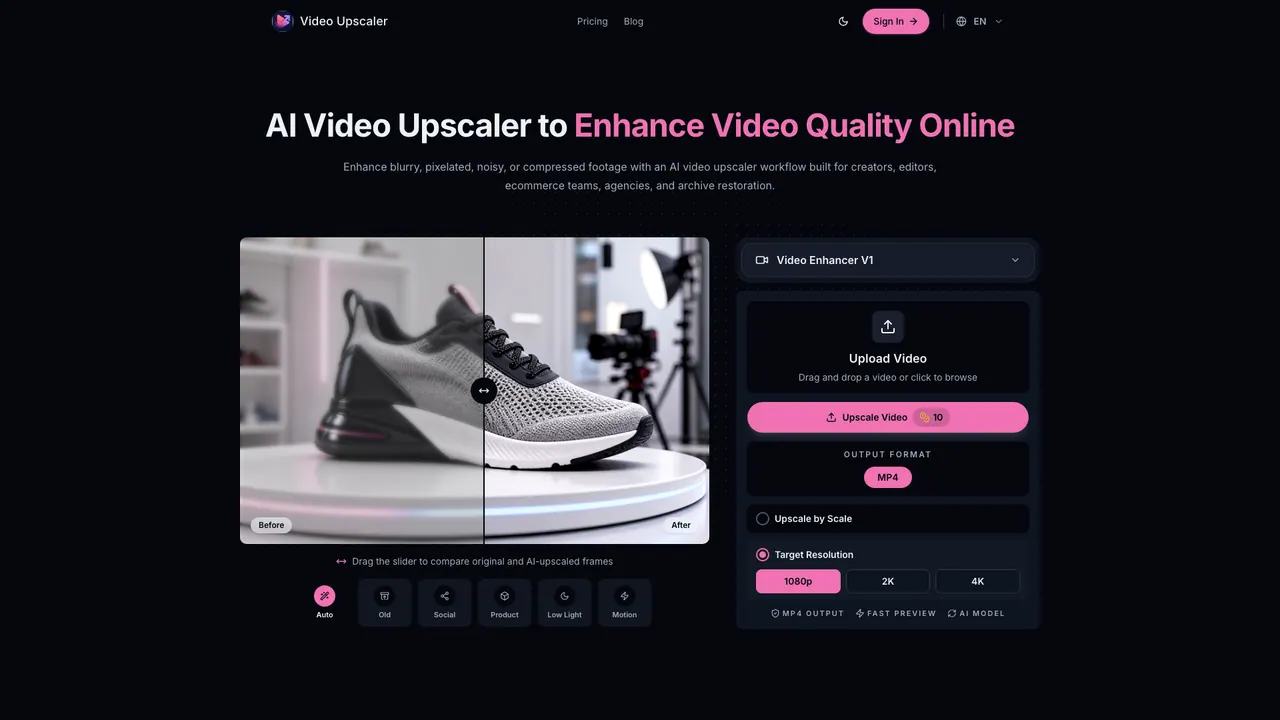
Video Upscaler is an online AI video upscaling workflow that helps improve video quality for creators, editors, ecommerce teams, agencies, and archive restoration. Upload a blurry, pixelated, noisy, or compressed clip, then choose an enhancement model and a preset tailored to the type of footage you’re working with.
The workflow is designed around quick verification. You can compare the original and AI-upscaled frames side by side using a slider, then inspect sharper edges, cleaner textures, face and detail recovery, motion stability, and compression cleanup before exporting. This makes it easier to decide whether the result looks acceptable, needs another pass, or should be replaced before you move into deeper editing.
Video Upscaler includes focused presets for common scenarios such as old footage, social clips, product videos, low light, and motion. It also keeps your export-related settings visible, including output format (MP4) and the fixed 2x upscaling approach for V1.
If you’re preparing reposts, product demos, client-ready previews, or archive handoff, Video Upscaler offers a simple upload → preset → preview → export flow with fast on-device browser processing. Results can vary by source quality, so it’s important to review for halos, over-sharpening, waxy detail, and other unnatural artifacts before delivery. Use only videos you have the rights to upload and use.
What kinds of videos can I improve with Video Upscaler?
You can upload blurry, pixelated, noisy, or compressed videos where you want higher-resolution output. The AI works best when the source still contains recoverable structure.
How do I check whether the upscaling result is good before exporting?
Use the before/after slider to compare original and upscaled frames. Review edges, texture, motion stability, and compression cleanup, and stop before export if you see halos, over-sharpening, or waxy/unfitting detail.
What output format does Video Upscaler export?
Video Upscaler exports MP4 output. In V1 settings, the upscaling is fixed at 2x with MP4 output.
Which presets should I use for different clip types?
Pick a preset based on your footage: Old for older material, Social for social clips, Product for product videos, Low Light for dim scenes, and Motion for moving footage. If your clip matches one of these categories, start there and verify with the preview.
Can I use Video Upscaler for client previews and archive restoration?
Yes—Video Upscaler is designed for creator workflows, ecommerce product demos, agency client-ready enhancement previews, and archive restoration use cases. Always confirm you have rights to upload and use the videos.
Do I need video editing experience to use it?
No. The process is built for quick use: upload your video, choose the preset, preview the before/after difference, then export the MP4 if the result looks usable.
This listing is claimed
Own Video Upscaler? Sign in with the email used to claim it to manage this listing, or upgrade to Pro for featured-first placement and a newsletter feature.