SkyboxKit
AI Image Generators from Text Tools
Create 360° skybox textures from text or up to four reference images, preview in your browser, then download a 2:1 PNG panorama or a cubemap ZIP.
Promoted
 Sidrune AI85% off. Stable Claude API for agent developers. Pay as you go. Invoices & refunds available.
 Pixmax.aiPixmax.ai is an all-in-one AI workspace for videos, visual stories, and marketing content.
 AI Checker PlusAI detector that highlights which passages AI wrote. Free check, no sign-up. Plagiarism too.
 RewindType any X/Twitter handle. Get their year back as a narrated video story. Then ask it anything.
 KurodyneSell the tools from your AI side projects. Listing is free.
 SEOify - Improve your SEO & rankingsBuild links to rank in Google. Improve your DR with links you can start building now.Advertise here270,000+ people visit Dang.ai every month.
What does SkyboxKit do?
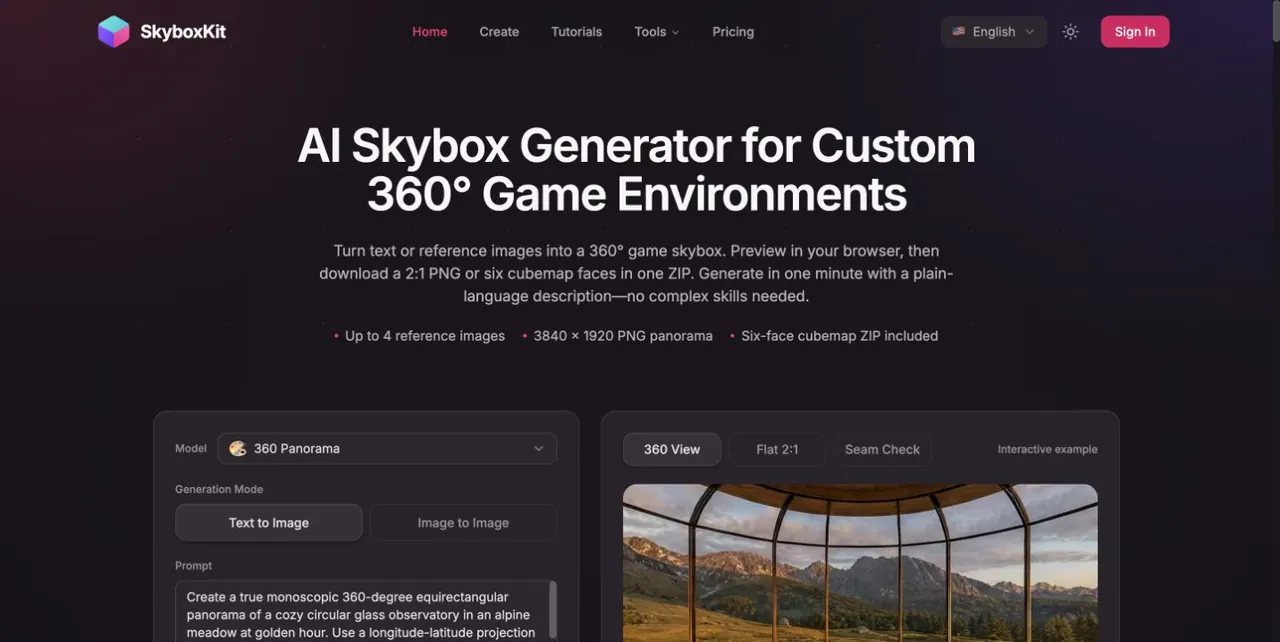
SkyboxKit is an AI skybox generator for creators who want a complete 360° environment without building a sky from scratch. You can generate a surrounding world using a plain-language prompt or by uploading up to four reference images to guide the setting, lighting, and overall visual style.
After generation, preview your result right in the browser with an interactive 360° viewer. Review the full wrap around your scene (not just the front view) by using the seam check and performing manual inspection across key areas like the horizon wrap, as well as the zenith and nadir.
When you’re ready to export, you can download the same generated scene in two formats. Get a 3840 × 1920 2:1 equirectangular PNG panorama, or export a cubemap as a ZIP containing six 1024 × 1024 PNG faces. Panorama downloads and cubemap exports are included with your generation, so you can choose the layout that best matches your project workflow.
SkyboxKit outputs PNG environment textures meant to be used as backgrounds or surrounding images in your own scenes (not 3D models or HDR lighting files). It’s a good fit for indie games, Roblox map sky replacements, engine skybox setup, and story pitches that benefit from an explorable 360° reference. Generation uses credits, and the generation mode shows a cost before you submit.
Can I generate a 360° skybox from text or images?
Yes—use a prompt for a text-based generation, or upload up to four reference images alongside your description to guide the setting, lighting, and style.
What files do I get after generating a scene?
You can download a 3840 × 1920 2:1 PNG panorama, and you can also export a cubemap ZIP containing six 1024 × 1024 PNG faces.
Does downloading a cubemap cost extra credits?
No. Panorama downloads and cubemap exports are included with your generation, so exporting the six cube faces doesn’t require additional generation credits.
How do I check for seams or wrapping issues?
Use the 360° viewer and the seam check to inspect the full sphere. Pay close attention to edge behavior at the horizon wrap, plus the very top (zenith) and bottom (nadir).
Is the output a 3D model or HDR lighting file?
No. The output is a PNG environment texture meant for your scene as a background/surrounding image, without 3D geometry or HDR lighting data.
Can I use the generated skybox commercially?
Yes. Personal, educational, and commercial use are supported under the Terms of Service. You still keep responsibility for making sure your inputs and outputs don’t infringe third-party rights.
This listing is claimed
Own SkyboxKit? Sign in with the email used to claim it to manage this listing, or upgrade to Pro for featured-first placement and a newsletter feature.