
Shycut
AI Video Maker Generators & Tools
Shycut is a free, private in-browser video editor that blurs faces and plates, cuts silences, and adds captions without uploading your video.
Promoted
 MuzieCreate professional AI music videos starring you. Bring a song or make one, done in minutes.
 AI Checker PlusAI detector that highlights which passages AI wrote. Free check, no sign-up. Plagiarism too.
 Pixmax.aiPixmax.ai is an all-in-one AI workspace for videos, visual stories, and marketing content.
 AdsfieldPro ads from one product photo — $40/year
 SEOify - Improve your SEO & rankingsBuild links to rank in Google. Improve your DR with links you can start building now.Advertise here330,000+ people visit Dang.ai every month.
What does Shycut do?
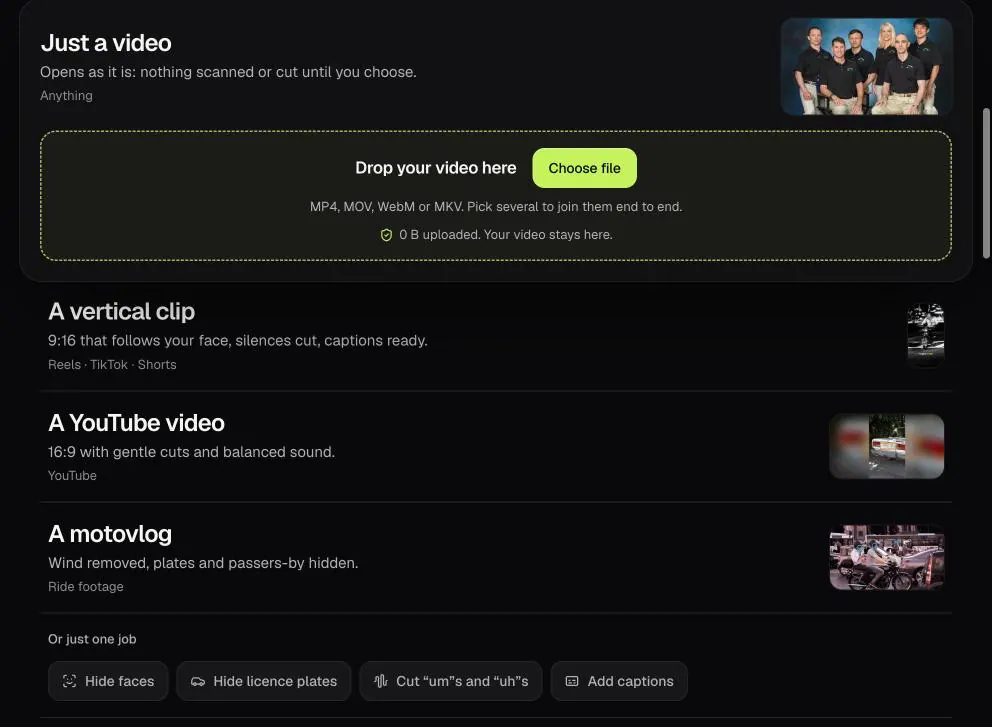
Shycut is a free video editor that runs entirely in your browser so your footage never needs to be uploaded. You can blur sensitive elements, remove dead air, and generate captions while keeping everything on-device.
Start by dropping in an existing file (MP4, MOV, WebM, or MKV) or importing audio (MP3, M4A, WAV). You can also pick multiple videos and join them end to end. Choose what you’re making—vertical clips for social, YouTube-style edits, or motovlog outputs—and Shycut handles the repetitive steps like sizing and targeted cleanup.
For Reels, TikTok, and Shorts, Shycut prepares a 9:16 vertical format that follows your face, cuts silences, and readies captions. For YouTube videos, it applies gentle cutting and balanced sound. For motovlogs, it removes wind noise and hides licence plates and passers-by, including support for GoPro GPS becoming a speed gauge.
You can also run single tasks such as hiding faces, hiding licence plates, cutting “um”s and “uh”s, or adding automatic captions. Location data from phones is wiped from exports, and there’s no sign-up, no watermark, and no server step—everything is processed locally in your browser.
Does Shycut upload my video to a server?
No. Shycut runs in your browser and processes the video locally, so your footage stays on your device.
Which formats can I edit in Shycut?
You can edit MP4, MOV, WebM, and MKV files, and you can also work with audio files like MP3, M4A, and WAV.
Can Shycut blur faces and licence plates?
Yes. You can blur moving faces and hide licence plates as separate jobs or as part of targeted presets like social clips and motovlogs.
Can it cut silences and filler words?
Yes. Shycut can remove dead air and cut “um”s and “uh”s automatically.
Does Shycut add captions, and what languages are supported?
Yes, it can add automatic captions. Caption languages are available in the app’s caption options.
Does it remove GPS/location data from phone footage?
Yes. Phone GPS location stored in video files is wiped from every export.
This listing is claimed
Own Shycut? Sign in with the email used to claim it to manage this listing, or upgrade to Pro for featured-first placement and a newsletter feature.