Reeldrift
AI Video Maker Generators & Tools
Reeldrift turns one brand description into auto-generated, voiced, captioned, and scheduled faceless TikTok & IG reels.

- Pricing
- Free
- Category
- Video
- Listed
- Jun 24, 2026
- Updated
- Jun 24, 2026
Promoted
 Pixmax.aiPixmax.ai is an all-in-one AI workspace for videos, visual stories, and marketing content.
 Sidrune AI85% off. Stable Claude API for agent developers. Pay as you go. Invoices & refunds available.
 SEOify - Improve your SEO & rankingsBuild links to rank in Google. Improve your DR with links you can start building now.Advertise here270,000+ people visit Dang.ai every month.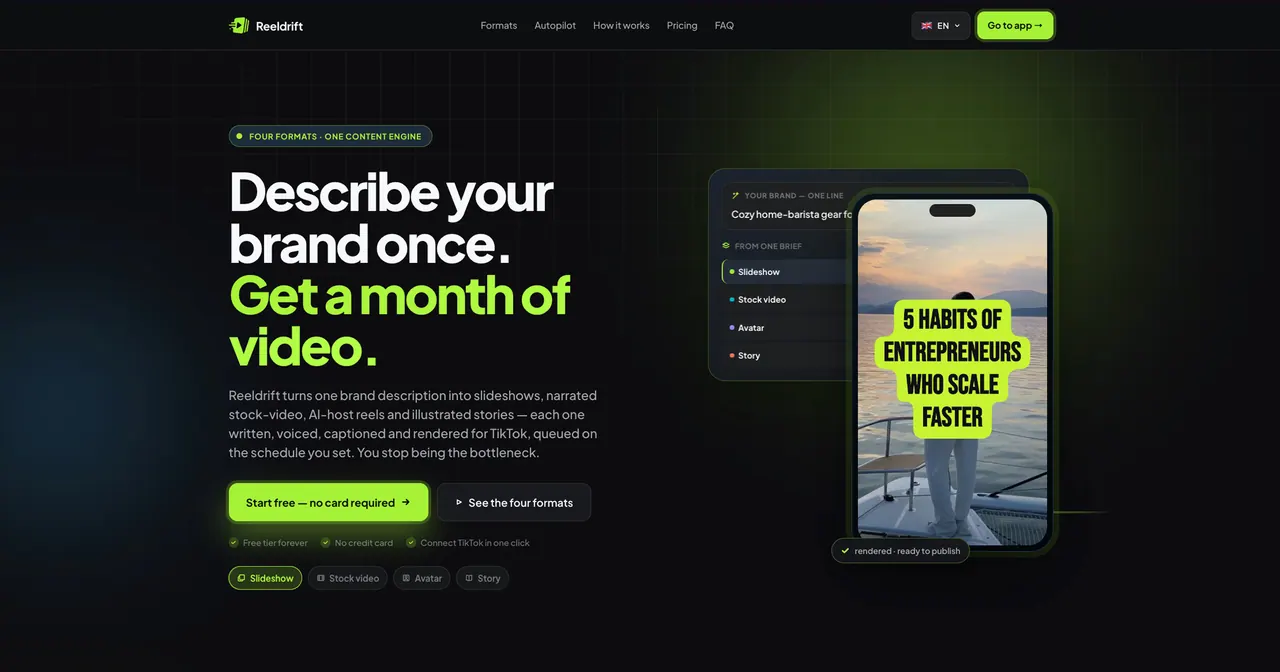
What does Reeldrift do?
Reeldrift is a content engine that lets you describe your brand once, then automatically generates and schedules faceless reels across four formats: slideshow, stock video, avatar host, and illustrated story. Each reel is written, voiced, captioned, rendered, and queued for publishing on the schedule you set—so you’re not stuck manually producing daily posts.
Under every video, Reeldrift handles the finishing touches: voiceover with timed delivery, burnt-in captions designed to survive re-uploads, and a music bed mixed underneath. You can choose from multiple caption styles and music tracks, or rely on defaults to ship content faster.
Set your weekly autopilot by choosing weekday slots, times, and a format per day. Reeldrift runs the cron to generate from your library first (including imported hooks and scripts) and fills remaining slots by generating new reels, then publishes TikTok-ready videos in your timezone. Multi-account support, analytics with links to every TikTok video, and MCP access for running Reeldrift from your AI workflow are available as you scale.
What four reel formats can Reeldrift generate?
Reeldrift supports slideshow reels, stock video reels, AI avatar host reels, and illustrated story reels—each created from your one brand description.
Do I need to be online for Reeldrift to publish?
No. Set your weekly schedule once, and the autopilot cron generates, renders, and queues reels to publish automatically in your timezone.
Can I use my own hooks or scripts instead of starting from scratch?
Yes. Import hooks and scripts as JSON; autopilot publishes from your library first and only generates new posts when slots are empty.
Does Reeldrift add voiceover, captions, and music automatically?
Yes. Reeldrift generates voiceover timing, burns captions into the video, and mixes in a music bed—so the finished reel is ready to post.
Can I edit or approve content before it goes out?
You can edit your brand description before saving, and you can import your own hooks/scripts to control what gets used. The scheduled autopilot runs based on the saved setup and your library.
How does TikTok connection work for autopublishing?
Connect your TikTok account in one click. Autopilot then queues posts according to your schedule, using TikTok’s official Content Posting API.
This listing is claimed
Own Reeldrift? Sign in with the email used to claim it to manage this listing, or upgrade to Pro for featured-first placement and a newsletter feature.