
Printpal
AI Profile Picture Generator Tools
Printpal helps you generate print-ready 3D models with AI and manage your 3D printing workflow using viewers, converters, and print cost/time tools.
- Category
- Profile picture
- Listed
- Oct 30, 2026
- Updated
- Oct 30, 2026
Promoted
 Sidrune AI85% off. Stable Claude API for agent developers. Pay as you go. Invoices & refunds available.
 Pixmax.aiPixmax.ai is an all-in-one AI workspace for videos, visual stories, and marketing content.
 AI Checker PlusAI detector that highlights which passages AI wrote. Free check, no sign-up. Plagiarism too.
 RewindType any X/Twitter handle. Get their year back as a narrated video story. Then ask it anything.
 KurodyneSell the tools from your AI side projects. Listing is free.
 SEOify - Improve your SEO & rankingsBuild links to rank in Google. Improve your DR with links you can start building now.Advertise here270,000+ people visit Dang.ai every month.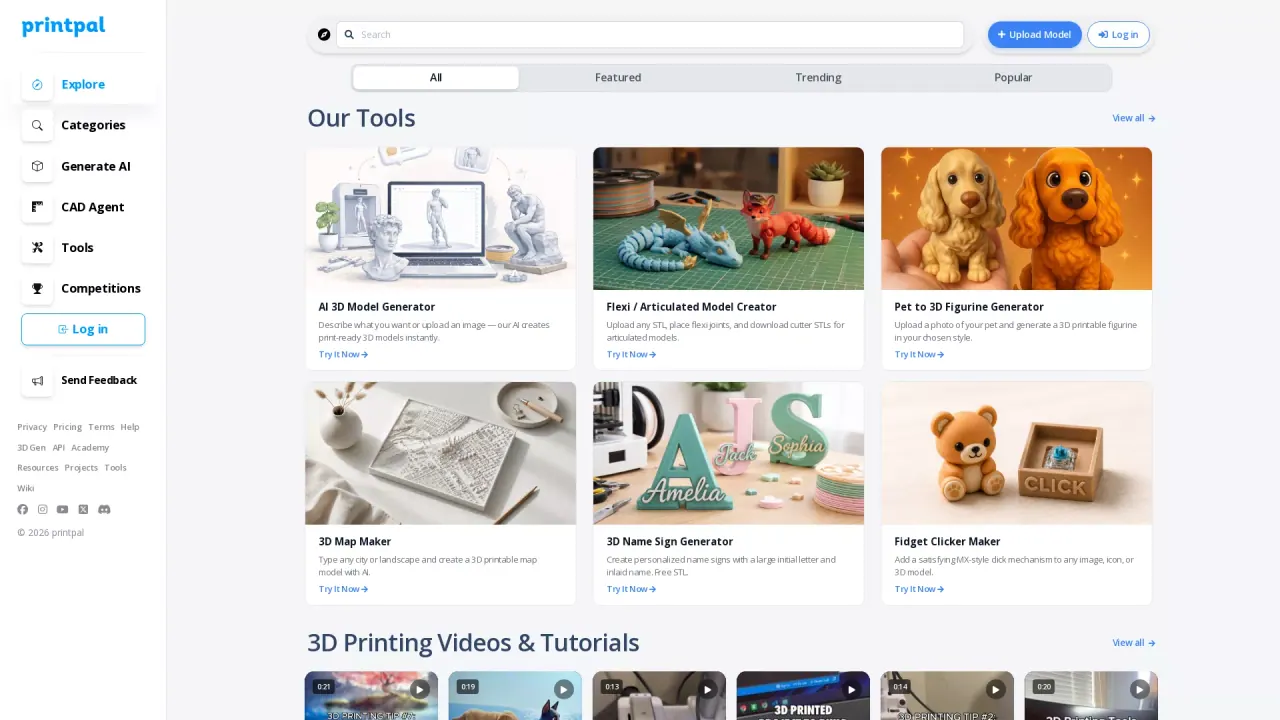
What does Printpal do?
Printpal is a curated collection of AI-powered tools for creating print-ready 3D models and for handling practical parts of the 3D printing workflow. Describe what you want or upload an image to generate 3D models instantly, or use dedicated generators for common print types like maps, architecture, vehicles, pets, signs, lithophanes, QR codes, and custom text.
Beyond generation, Printpal includes browser-based CAD and 3D utilities to help you refine and export your work. You can upload existing models and use tools such as the Flexi / Articulated Model Creator to add flexi joints and download cutter STLs. There are also builder-style tools like map builders, terrain sculpting, brick builders, and bin/sorting tray generators with live 3D previews and instant STL downloads.
For inspection and file handling, Printpal offers a 3D Model Viewer and a 3D Model Format Converter that works with STL, OBJ, GLB, GLTF, and PLY. If you want to plan or verify results, use the 3D Print Animator to generate a realistic printing timelapse from STL/3MF/G-code, exporting MP4 or PNG.
To support print planning and optimization, Printpal includes estimators and calculators for time and cost (including resin), plus calibration and material tools such as layer-height guidance, E-steps, flow rate/volumetric flow rate, filament drying guides, and shrinkage scaling. Create, convert, visualize, and estimate—then export print-ready outputs in supported formats such as STL, 3MF, and OBJ.
How do I generate a print-ready 3D model with Printpal?
Use the AI 3D Model Generator to describe what you want or upload an image—then download the resulting print-ready 3D model output.
Can I start from my own existing 3D files?
Yes. Upload models (including STL) to tools like the Flexi / Articulated Model Creator, and use the viewer or format converter to inspect and transform files.
What 3D file types can I view in the browser?
You can view STL, OBJ, GLB, GLTF, and PLY directly in your browser with the 3D Model Viewer.
Can Printpal convert my models between formats without sending files elsewhere?
Yes. The 3D Model Format Converter converts between STL, OBJ, GLB, GLTF, and PLY instantly and keeps everything in-browser.
How can I estimate 3D print time and cost?
Use the Print Time Estimator to estimate duration from settings like layer height, print speed, and infill. Use the 3D Print Cost Calculator (or the Resin Print Cost Calculator) to cost out filament/resin, electricity, and other relevant factors.
Is there a way to preview a print before running it?
Yes. The 3D Print Animator can generate a realistic printing timelapse from an STL, 3MF, or G-code, and export an MP4 or PNG for review.
Is this your tool?
Claim Printpal to manage this listing, or upgrade to Pro for featured-first placement and a newsletter feature.