
PDF Index Generator
AI Book Writing Tools & Generators
Create a professional back-of-book index from a PDF using AI or rule-based term lists.
- Pricing
- Free
- Category
- Books
- Listed
- Sep 7, 2026
- Updated
- Sep 8, 2026
Promoted
 AI Checker PlusAI detector that highlights which passages AI wrote. Free check, no sign-up. Plagiarism too.
 RewindType any X/Twitter handle. Get their year back as a narrated video story. Then ask it anything.
 KurodyneSell the tools from your AI side projects. Listing is free.
 Sidrune AI85% off. Stable Claude API for agent developers. Pay as you go. Invoices & refunds available.
 Pixmax.aiPixmax.ai is an all-in-one AI workspace for videos, visual stories, and marketing content.
 SEOify - Improve your SEO & rankingsBuild links to rank in Google. Improve your DR with links you can start building now.Advertise here330,000+ people visit Dang.ai every month.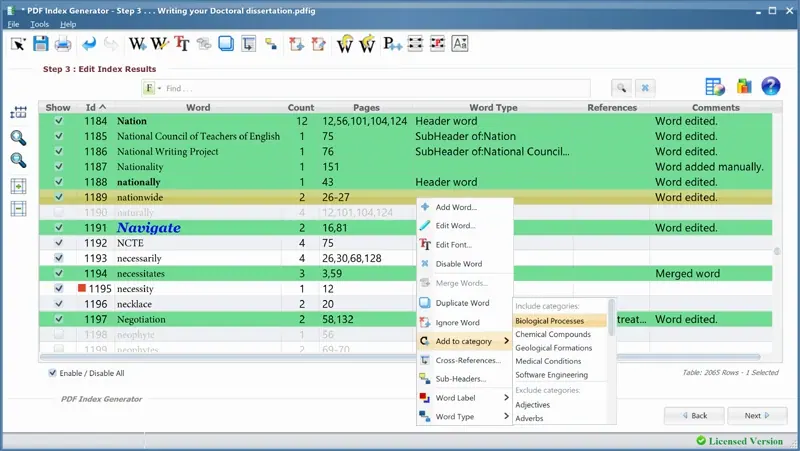
What does PDF Index Generator do?
PDF Index Generator is a desktop application that creates back-of-book indexes from finished PDF proofs. It parses your PDF, finds index-worthy terms, and outputs an alphabetical index with page references that you can write back into your book.
Choose between two indexing modes. Classic Mode builds the index from a list of terms, while AI-Mode uses context-aware AI to extract keywords and suggest terms you can accept or reject before generating the final index. AI-Mode also supports name reversal (e.g., “John Smith” → “Smith, John”), groups related concepts under common headings, and helps manage headers, sub-headers, and cross references.
The tool writes results to PDF or exports to DOCX for editing, and it includes book index templates and formatting options (including custom fonts for index terms). It runs offline on Windows, macOS, and Linux, and the trial indexes the first 10 pages of a document.
What kind of documents can I index with PDF Index Generator?
You can generate a back-of-book index from a finished PDF proof, including long books up to 1000+ pages.
How do the Classic Mode and AI-Mode differ?
Classic Mode uses a user-provided list of terms. AI-Mode uses context-aware AI to suggest terms from your PDF, and you can review the suggestions before generating the index.
Does it handle name formatting like “John Smith” → “Smith, John”?
Yes. AI-Mode can reverse names so entries appear in the desired alphabetized format.
Can it include headers, sub-headers, and cross references?
Yes. The tool can handle header and sub-header entries and cross references when building the index.
Where can the generated index be saved?
You can write the generated index to a PDF (as an appended page) or export it to DOCX for further editing.
Is indexing done offline or does it upload my files?
Indexing works offline, so document contents aren’t uploaded to an external server.
This listing is claimed
Own PDF Index Generator? Sign in with the email used to claim it to manage this listing, or upgrade to Pro for featured-first placement and a newsletter feature.