
ObjectRemover
AI Video Maker Generators & Tools
Object Remover is an online AI tool that removes unwanted objects from MP4/MOV videos and images, tracking the target across frames.
Promoted
 AI Checker PlusAI detector that highlights which passages AI wrote. Free check, no sign-up. Plagiarism too.
 RewindType any X/Twitter handle. Get their year back as a narrated video story. Then ask it anything.
 KurodyneSell the tools from your AI side projects. Listing is free.
 Sidrune AI85% off. Stable Claude API for agent developers. Pay as you go. Invoices & refunds available.
 Pixmax.aiPixmax.ai is an all-in-one AI workspace for videos, visual stories, and marketing content.
 SEOify - Improve your SEO & rankingsBuild links to rank in Google. Improve your DR with links you can start building now.Advertise here330,000+ people visit Dang.ai every month.
What does ObjectRemover do?
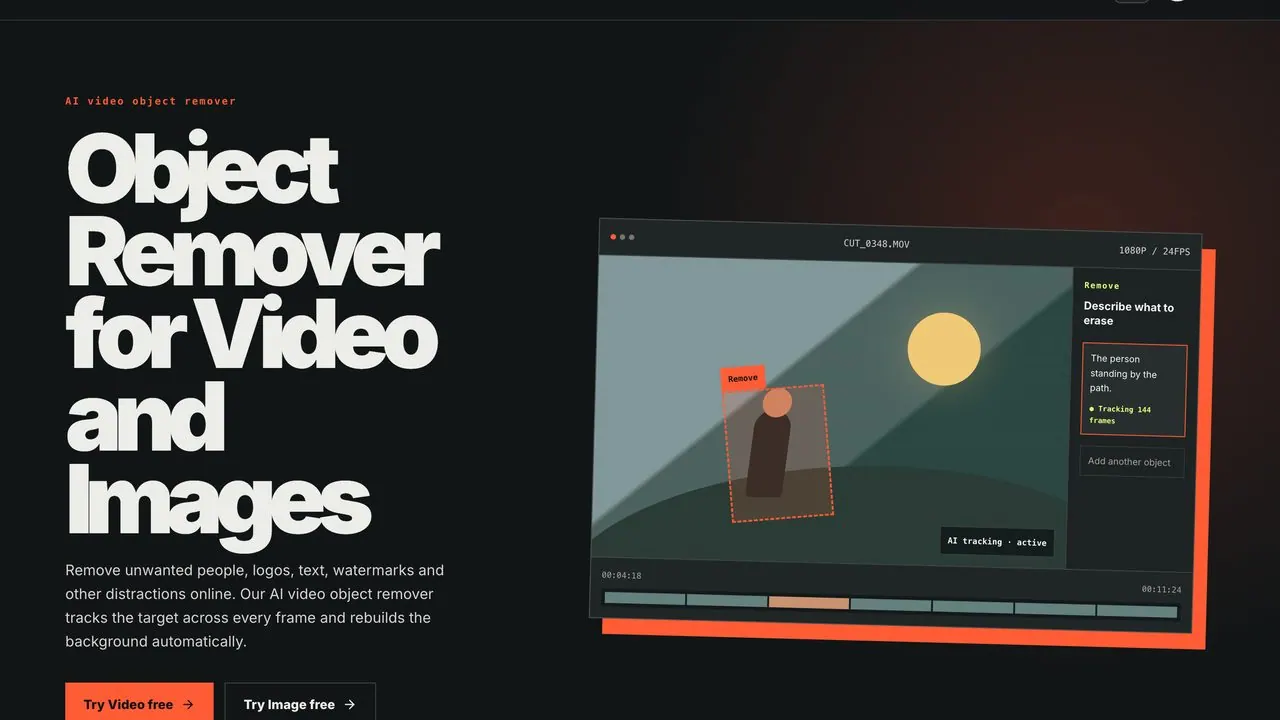
Object Remover helps you clean distraction from your media—remove unwanted people, logos, text, watermarks, and other elements from video or images. For video, it works by tracking the object you want to erase across every frame, then rebuilding the background automatically so you can export a cleaner result.
To use it, upload an MP4 or MOV (photos work too when the edit starts from a still). Describe what you want to remove using natural language, or brush over the target on a clear frame to define the mask. Once the target is marked, the tracking stays locked as the object moves through the shot—so you don’t need frame-by-frame masking, even with camera pans or turns. You can drag the slider to review how the tracking mask performs, fine-tune if needed, and then download the cleaned export.
It’s designed for people who already have the shot they want to keep, but need distractions removed—whether it’s a passer-by crossing the frame, an unwanted logo, or text/watermark elements. The same workflow works for both images and videos, with tracking taking over whenever the target moves.
Pricing is credit-based. Start with a free plan ($0) that includes a low-res preview with a daily usage limit and 10 free credits after you sign up, with no credit card required. For ongoing use, you can pay as you go by buying credits in packs (30/50/100/400), with custom plans available for bigger packs, longer videos, or team workflows.
What can I remove with Object Remover?
You can remove unwanted people, logos, text, watermarks, and other distractions from video and images.
Does it track moving objects across a video?
Yes. You mark the target once, and the AI tracks it through every frame, keeping the tracking mask locked as the object moves.
How do I tell the tool what to erase?
Use a natural-language prompt (e.g., “the players”) or brush over the target on a clear frame to build the tracking mask.
What formats are supported?
You can edit MP4 and MOV videos and images in JPG and PNG formats.
Do I need to install desktop software?
No. It runs online in your browser with no desktop app needed.
How does pricing work?
You can start free ($0) with a low-res preview and a daily usage limit, and you’ll get 10 free credits after signing up. For more work, you can top up credits on demand (30/50/100/400), and custom plans are available for larger needs.
This listing is claimed
Own ObjectRemover? Sign in with the email used to claim it to manage this listing, or upgrade to Pro for featured-first placement and a newsletter feature.