
Motion Hero
AI Video Maker Generators & Tools
Create interactive Shopify product video with GSAP scroll, guided playback, or standard banner mode—using one visual editor and timeline.
- Pricing
- Free
- Category
- Video
- Listed
- Aug 15, 2026
- Updated
- Oct 17, 2026
Promoted
 Sidrune AI85% off. Stable Claude API for agent developers. Pay as you go. Invoices & refunds available.
 Pixmax.aiPixmax.ai is an all-in-one AI workspace for videos, visual stories, and marketing content.
 AI Checker PlusAI detector that highlights which passages AI wrote. Free check, no sign-up. Plagiarism too.
 RewindType any X/Twitter handle. Get their year back as a narrated video story. Then ask it anything.
 KurodyneSell the tools from your AI side projects. Listing is free.
 SEOify - Improve your SEO & rankingsBuild links to rank in Google. Improve your DR with links you can start building now.Advertise here270,000+ people visit Dang.ai every month.
What does Motion Hero do?
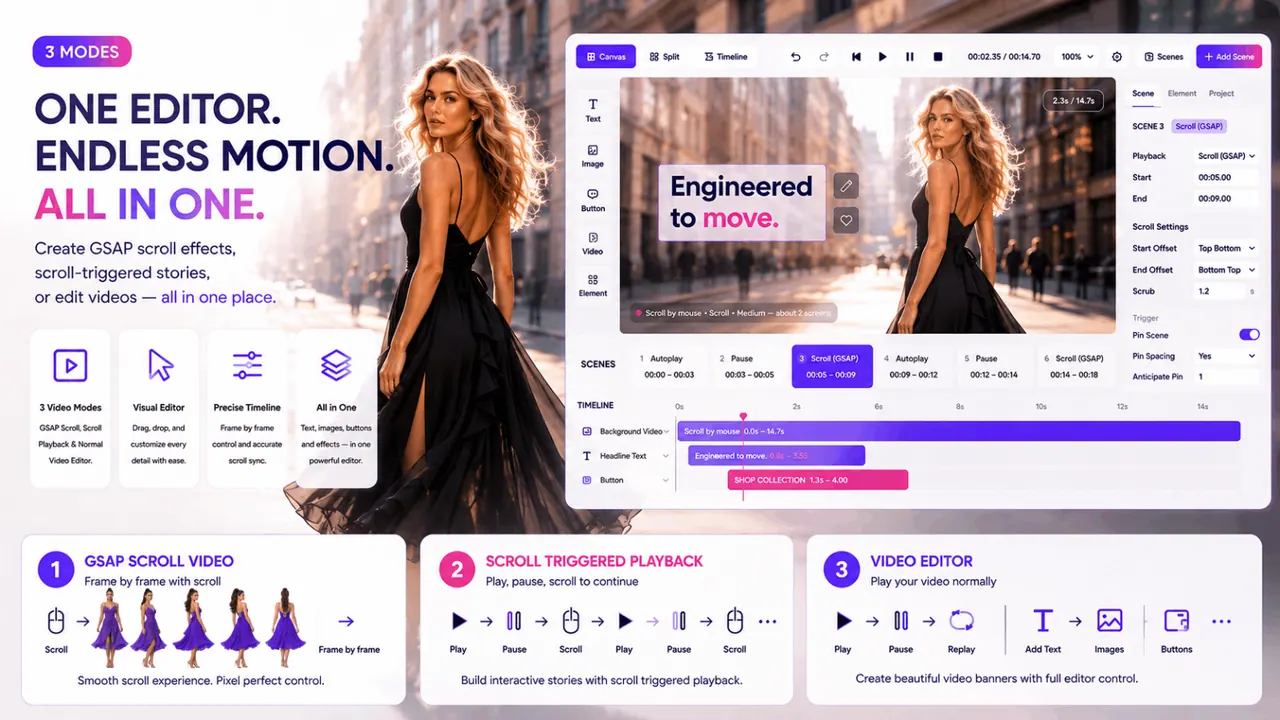
Motion Hero is a Shopify app for creating interactive video experiences that feel like premium, scroll-driven product pages—without rebuilding your storefront in custom front-end JavaScript. It combines GSAP scroll animation, scroll-triggered storytelling, and a visual video editor so you can design how customers interact with your product video.
Motion Hero offers three modes in one workflow: (1) GSAP frame-by-frame scroll, where video progress is tied to the customer’s scrolling; (2) guided playback, where the video plays automatically, pauses on key selling moments, and continues as the customer scrolls; and (3) a standard video player mode for Shopify video banners, where you can add timed overlays and animations while video plays normally.
Use the visual editor to place and time content directly over your video. Add text, images, buttons, icons, and shapes, then control exactly when each element appears and exits using a timeline. You can also build separate desktop and mobile layouts for a responsive presentation.
Motion Hero is built for merchants who want to turn product video into an interactive shopping experience. Preview the experience before publishing it to your Shopify storefront.
What is Motion Hero used for on Shopify?
Motion Hero helps you turn product video into an interactive experience on your Shopify storefront—using scroll-controlled video, guided play/pause sequences, or timed video banner overlays.
What are the three Motion Hero video modes?
Motion Hero includes: GSAP frame-by-frame scroll, guided playback (play/pause with scroll to continue), and a standard video player mode for Shopify video banners with timed overlays.
How does GSAP scroll video work in Motion Hero?
Video progress is connected to the customer’s page scrolling, so moving forward or backward through the page drives the video frame by frame.
Can I add text, buttons, and other overlays on top of the video?
Yes. Use the visual editor to add text, images, buttons, icons, and shapes, then time their entrance and exit on a timeline.
Does Motion Hero support both desktop and mobile layouts?
Yes. You can build separate desktop and mobile layouts within the editor.
Is Motion Hero a traditional video editor?
It’s designed specifically for interactive storefront video. Instead of traditional editing tools, it focuses on timelines, timed overlays, and scroll/guided playback behavior in Shopify.
This listing is claimed
Own Motion Hero? Sign in with the email used to claim it to manage this listing, or upgrade to Pro for featured-first placement and a newsletter feature.