
LobbyClip
AI Video Maker Generators & Tools
Turn two photos into a Hotel Lobby–style AI duo MP4 in 6 scenes, with 9:16/16:9/1:1 formats and one-time payments.
Promoted
 AI Checker PlusAI detector that highlights which passages AI wrote. Free check, no sign-up. Plagiarism too.
 RewindType any X/Twitter handle. Get their year back as a narrated video story. Then ask it anything.
 KurodyneSell the tools from your AI side projects. Listing is free.
 Sidrune AI85% off. Stable Claude API for agent developers. Pay as you go. Invoices & refunds available.
 Pixmax.aiPixmax.ai is an all-in-one AI workspace for videos, visual stories, and marketing content.
 SEOify - Improve your SEO & rankingsBuild links to rank in Google. Improve your DR with links you can start building now.Advertise here330,000+ people visit Dang.ai every month.
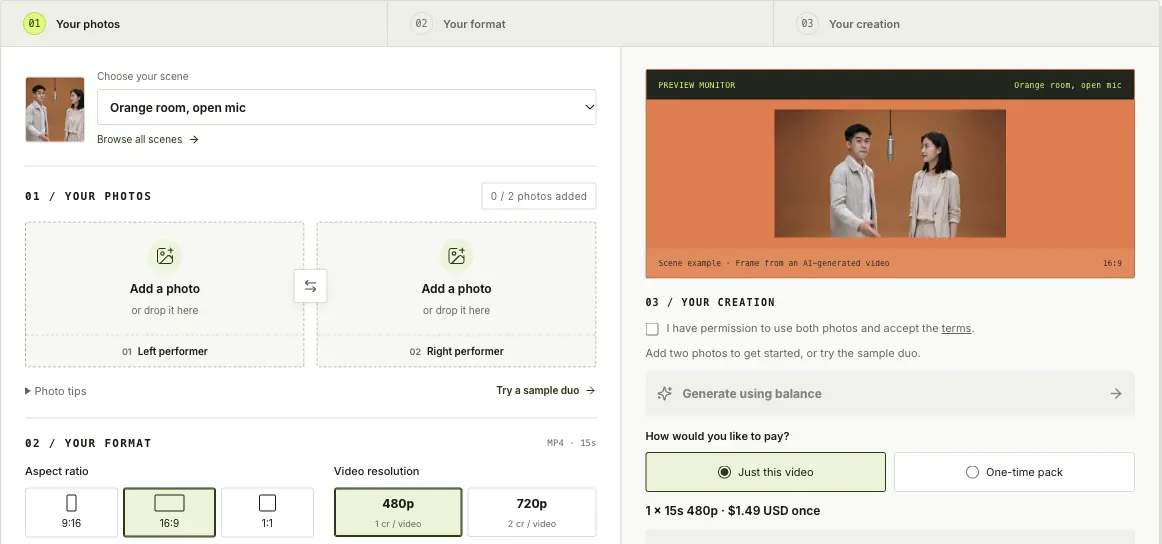
What does LobbyClip do?
LobbyClip is a Hotel Lobby–style AI video generator that turns two uploaded photos into a short duo MP4, with one photo reference for each performer. The “left” and “right” performer each has their own slot, helping keep who’s who as the scene plays out.
Pick a scene template from a curated set, then tailor the output to your platform. Choose among the available aspect ratios—9:16 (vertical), 16:9 (landscape), or 1:1 (square)—and select the resolution (480p or 720p). You can also set your video duration within the allowed range before generating the clip.
The workflow is straightforward: add two photos, preview the photo layout, select a scene, then generate an MP4 download. You can also try a free lifetime 3-second 480p trial during daily trial hours using Google sign-in (subject to capacity), with no subscription required. Paid generations use one-time purchases (not a subscription), and you can choose either a single video purchase or a one-time pack.
Note that AI-generated results—motion, likeness, and lip sync—can vary, so it helps to try a sample duo first and preview your “casting board” before committing to your final generation.
How does LobbyClip work—what photos should I upload?
Upload two photos: one for the left performer and one for the right performer. Use clear, front-facing images for the best chance of consistent results.
What scenes can I choose from in LobbyClip?
You can choose from six Hotel Lobby-style templates, including people scenes like “Orange room, open mic,” “After-hours check-in,” and “Neon side B,” plus animal scenes like “Fox meets red panda,” “Sage studio cats,” and “Rooftop good dogs.”
What output formats and resolutions are available?
Generate MP4 videos in 9:16, 16:9, or 1:1 aspect ratios, and select 480p or 720p resolution for your final download.
Do I need a subscription to generate videos?
No. LobbyClip uses one-time purchases rather than a subscription for paid videos.
How much does a LobbyClip video cost?
Single-video pricing is $1.49 USD for 480p and $2.49 USD for 720p (one-time). You can also choose a one-time pack option instead of paying per video.
Can I try LobbyClip for free?
Yes—there’s a one-time lifetime free trial of a 3-second, 480p video during daily trial hours using Google sign-in, subject to generation availability and no automatic retries.
This listing is claimed
Own LobbyClip? Sign in with the email used to claim it to manage this listing, or upgrade to Pro for featured-first placement and a newsletter feature.