
KoiCreator
Verified · 18+ adult content
AI Video Maker Generators & Tools
Koicreator generates AI images and short videos from prompts or reference images, offering NSFW & SFW creation plus presets and studio modes.
Promoted
 Dreemy AINSFW AI Image, AI Video Generator. Free Unlimited NSFW AI Roleplay.
 Hot Muses UniverseHot Muses Universe (HMU) is an 18+ AI girlfriend platform with ready-made characters
 AI Checker PlusAI detector that highlights which passages AI wrote. Free check, no sign-up. Plagiarism too.
 RewindType any X/Twitter handle. Get their year back as a narrated video story. Then ask it anything.
 KurodyneSell the tools from your AI side projects. Listing is free.
 XVeed AIXVEED is an 18+ adult AI video generator for image-to-video, pose-to-scene, and short micro-dram
 Sidrune AI85% off. Stable Claude API for agent developers. Pay as you go. Invoices & refunds available.
 Pixmax.aiPixmax.ai is an all-in-one AI workspace for videos, visual stories, and marketing content.
 MoMoo AIFree unlimited NSFW AI chat, 4K images & 30s videos on MoMoo AI. Zero filters, no login!
 SEOify - Improve your SEO & rankingsBuild links to rank in Google. Improve your DR with links you can start building now.Advertise here330,000+ people visit Dang.ai every month.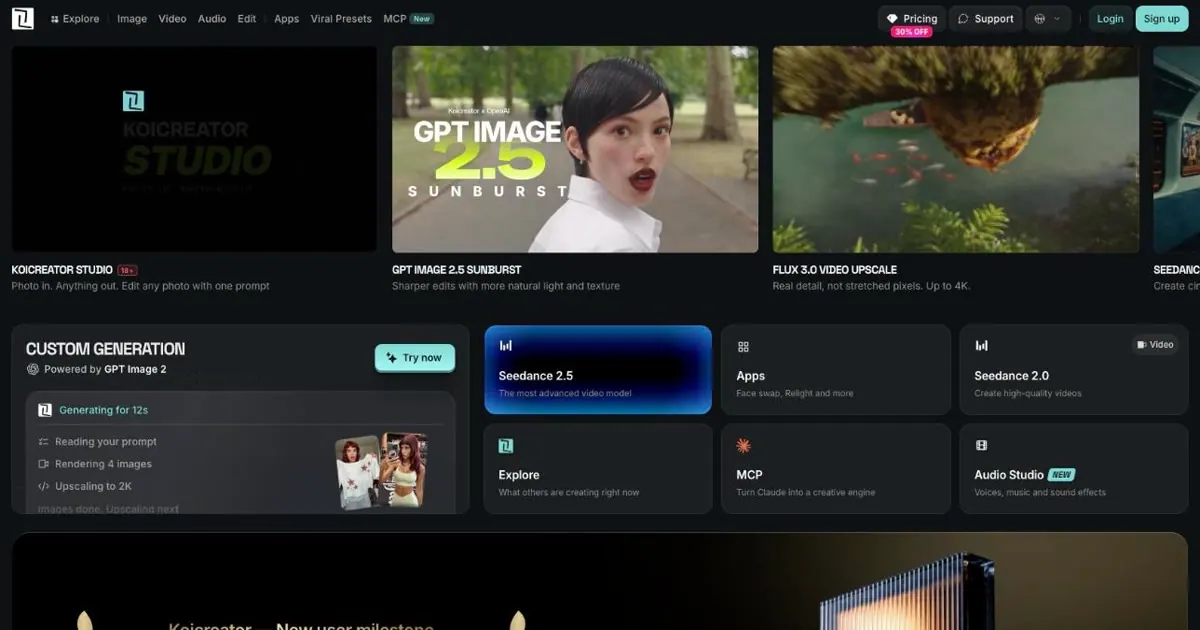
What does KoiCreator do?
Koicreator is an AI image and video generator built for creating both NSFW and SFW content. You can generate images and short video clips from text prompts, or use a reference image to guide the output—helping you move from concept to a consistent visual style.
Core workflows include text-to-image, image-to-video, and ongoing iteration with prompt refinements. The platform also features content-focused discovery through curated “viral presets,” letting you quickly explore popular concepts and styles before adjusting details for your final result. Generation modes such as “Koicreator Studio” and “Koicreator Motion” support different ways of working on images and motion.
For creators who want more control, Koicreator includes tools aimed at consistency and output quality. That includes options like face-swap, style presets, and upscaling to enhance your images as you refine your renders. You can also explore different AI generators listed within the experience.
Pricing is available via a FREE TRIAL with signup. After the trial, you can continue using pay-as-you-go credits (including options to buy credits or top up). Credit-based usage and a Pro plan with monthly credits are also available.
What kinds of content can I create with Koicreator?
You can generate AI images and short video clips. Koicreator supports both NSFW & SFW outputs based on the prompts and presets you choose.
Can I generate from a text prompt and a reference image?
Yes. Use text prompts to create new images or clips, and you can use a reference image to guide image-to-video output and overall look.
What are “viral presets” in Koicreator?
Viral presets are curated prompt/style starting points that help you quickly try popular looks and concepts. You can then iterate by refining prompts and settings.
Does Koicreator include face-swap and style presets?
Yes. It includes face-swap support, along with style presets to help shape the final look.
What tools help improve the quality of generated images?
Koicreator includes upscaling so you can enhance the detail of your generated images during the refinement process.
How does Koicreator billing work after the free trial?
You start with a free trial. After that, you can use pay-as-you-go credits (with options to buy credits or top up), and there’s also a Pro plan with monthly credits.
This listing is claimed
Own KoiCreator? Sign in with the email used to claim it to manage this listing, or upgrade to Pro for featured-first placement and a newsletter feature.