
kelma.chat
AI Chatting Tools
Kelma turns your website into an AI chat agent that answers in your brand voice and captures leads across channels.
- Pricing
- Free
- Category
- Chat
- Listed
- Aug 17, 2026
- Updated
- Aug 17, 2026
Promoted
 AI Checker PlusAI detector that highlights which passages AI wrote. Free check, no sign-up. Plagiarism too.
 RewindType any X/Twitter handle. Get their year back as a narrated video story. Then ask it anything.
 KurodyneSell the tools from your AI side projects. Listing is free.
 Sidrune AI85% off. Stable Claude API for agent developers. Pay as you go. Invoices & refunds available.
 Pixmax.aiPixmax.ai is an all-in-one AI workspace for videos, visual stories, and marketing content.
 SEOify - Improve your SEO & rankingsBuild links to rank in Google. Improve your DR with links you can start building now.Advertise here330,000+ people visit Dang.ai every month.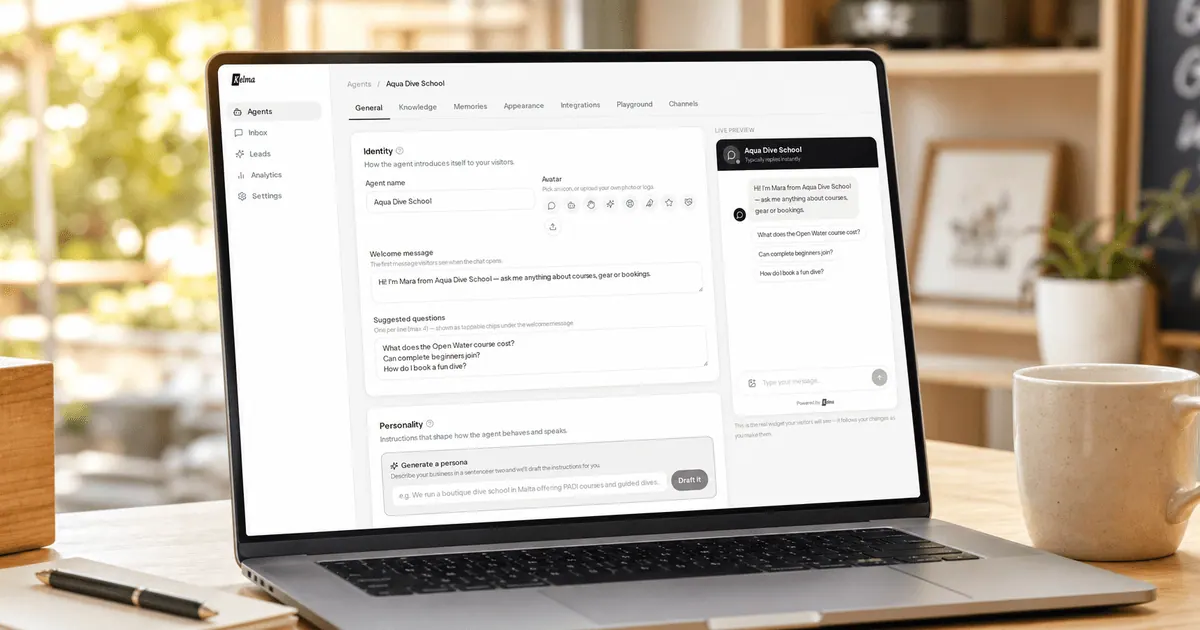
What does kelma.chat do?
Kelma creates an AI customer chat agent by learning your website and other provided content. Paste your website address, and Kelma discovers your pages, reads them, and organizes knowledge by page and section. You can also add PDFs, links, or pasted text, and re-sync sources whenever your content changes.
The agent can be embedded on your site via a one-line chat widget or an iframe, so visitors can get instant answers wherever they are reading. It captures leads with a contact form that appears based on your chosen timing, and keeps full conversation transcripts in a dashboard and via email for your team to review.
Kelma is designed to stay on-brand and on-topic by restricting answers to your content—when it doesn’t know, it directs the visitor to your team instead of guessing. If you want to step in, you can take over any conversation live from the inbox, with the AI pausing that chat and handing control back when you’re done. Kelma also supports scheduling (via Cal.com or Calendly), plus alerts for leads, callbacks, and handoffs.
How does Kelma learn what my agent should answer?
You point Kelma at your website so it discovers pages via your sitemap and reads them, organizing knowledge by page and section. You can also add PDFs, individual links, or pasted text (and re-sync when content changes).
What does the setup look like to get an agent live on my site?
Paste your website address, choose branding and the agent’s scope, then copy one line to embed the chat widget or use an iframe. The chat loads only when a visitor clicks it.
Can I prevent the agent from inventing prices or policies?
Yes. You can restrict answers to your content so the agent won’t make up prices or policies. When it doesn’t know, it hands off to your team instead.
How does lead capture work?
You choose when the contact form appears (before chat, after a reply, after a few messages, or on demand), plus which fields it asks for. Submissions go to your email and also appear in your dashboard with the full conversation attached.
Can I take over and reply as a human during a chat?
Yes. Open a conversation in the inbox to reply live while the AI pauses for that visitor. You can then hand back control to the AI when you’re done.
Does the agent support booking meetings?
Yes. Connect Cal.com or Calendly so the agent can check real availability and book the meeting inside the chat, then sync the contact to your CRM and notify your team.
This listing is claimed
Own kelma.chat? Sign in with the email used to claim it to manage this listing, or upgrade to Pro for featured-first placement and a newsletter feature.