
ImageWise.ai
AI Image Generators from Text Tools
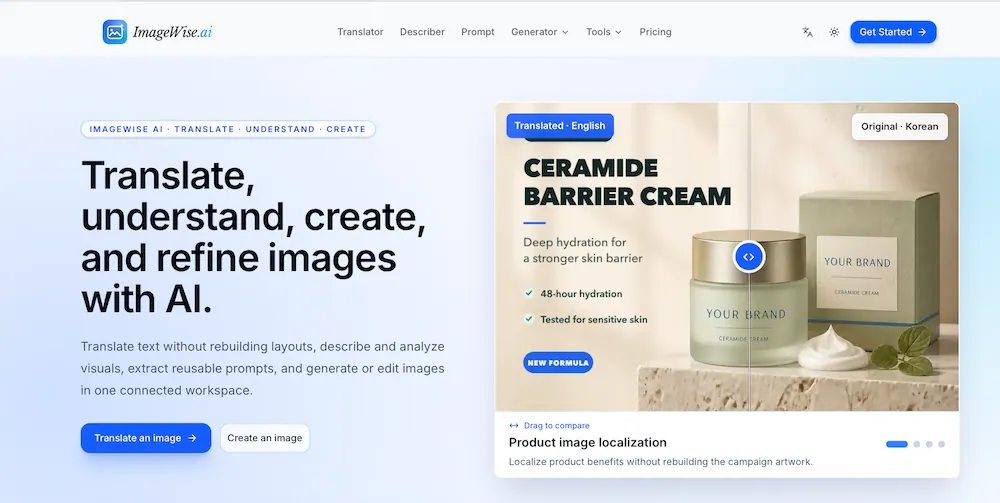
ImageWise.ai translates text inside images with layout-aware results, then describes, generates, and refines visuals in one workspace.
- Pricing
- Free
- Category
- Image
- Listed
- Aug 14, 2026
- Updated
- Oct 16, 2026
Promoted
 Sidrune AI85% off. Stable Claude API for agent developers. Pay as you go. Invoices & refunds available.
 Pixmax.aiPixmax.ai is an all-in-one AI workspace for videos, visual stories, and marketing content.
 AI Checker PlusAI detector that highlights which passages AI wrote. Free check, no sign-up. Plagiarism too.
 RewindType any X/Twitter handle. Get their year back as a narrated video story. Then ask it anything.
 KurodyneSell the tools from your AI side projects. Listing is free.
 SEOify - Improve your SEO & rankingsBuild links to rank in Google. Improve your DR with links you can start building now.Advertise here270,000+ people visit Dang.ai every month.
What does ImageWise.ai do?
ImageWise.ai is an all-in-one AI image workspace designed to translate, understand, and transform visual content without bouncing between multiple tools. Start by uploading an image—like a screenshot, menu, manga panel, poster, label, or product graphic—and ImageWise detects embedded text, interprets it using surrounding visual context, and places translated copy back into the original layout for review and refinement.
Beyond translation, ImageWise helps you make sense of what’s in an image. Use image describing and analysis features to generate clear descriptions, captions, and alt text, or ask questions with Chat With Image for contextual answers. If you want to reuse visuals for creation, Image to Prompt turns reference images into structured prompts, and the AI Image Generator can create new images from prompts or references, then edit or enhance the results.
For day-to-day workflows, ImageWise includes practical browser tools like resizing, compressing, converting formats (PNG/JPG/WebP), cropping, blurring, flipping, splitting, merging, and removing backgrounds (including GIF background removal). It also offers higher-impact editing options such as object and people removal, text removal, watermark removal, outpainting, old photo restoration, upscaling, enhancement, and metadata removal.
ImageWise plans include a free trial where you can try each AI feature once per day, and all plans include the free browser tools. AI credits power translation, description, analysis, prompts, visual Q&A, and image generation/editing: Starter ($9/mo) includes 100 AI credits/month, Pro ($29/mo) includes 350 AI credits/month, and Enterprise ($99/mo) includes 1,200 AI credits/month. Monthly credits expire after 35 days; annual plans and credit packs expire after 12 months, and failed AI tasks are refunded automatically.
What does “layout-aware” translation mean in ImageWise.ai?
Translated text is placed back into the image while keeping the original visual layout as closely as possible, so you can review and refine without manually rebuilding artwork.
Which types of images can I upload for translation?
You can upload screenshots, menus, manga pages, posters, product images, labels, notices, and other graphics that contain text.
Can I translate an image into English automatically?
Yes—ImageWise supports translating image text into English and can detect and use the source language automatically, so you mainly choose your target language.
What languages are supported for image translation?
ImageWise offers translation between multiple languages, including Japanese, Chinese (Simplified/Traditional), Korean, and many others—then you can translate the extracted text into your chosen target language.
Is there a free way to test ImageWise.ai?
Yes. You can try each AI feature once per day for free. Sign in to continue and keep results in your account.
How do ImageWise plans and AI credits work?
All plans include the free browser tools, while AI credits cover translation, description, analysis, prompts, visual Q&A, and image generation/editing. Credits refresh based on plan timing (monthly credits expire after 35 days; annual plans/credit packs after 12 months), and failed AI tasks are refunded automatically.
This listing is claimed
Own ImageWise.ai? Sign in with the email used to claim it to manage this listing, or upgrade to Pro for featured-first placement and a newsletter feature.