
Hotel Lobby Video AI
AI Video Maker Generators & Tools
Turn two photos into a 15s orange-studio hotel-lobby rap video with left/right placement, beat, and sound included.
Promoted
 KurodyneSell the tools from your AI side projects. Listing is free.
 Pixmax.aiPixmax.ai is an all-in-one AI workspace for videos, visual stories, and marketing content.
 AI Checker PlusAI detector that highlights which passages AI wrote. Free check, no sign-up. Plagiarism too.
 RewindType any X/Twitter handle. Get their year back as a narrated video story. Then ask it anything.
 SEOify - Improve your SEO & rankingsBuild links to rank in Google. Improve your DR with links you can start building now.Advertise here330,000+ people visit Dang.ai every month.
What does Hotel Lobby Video AI do?
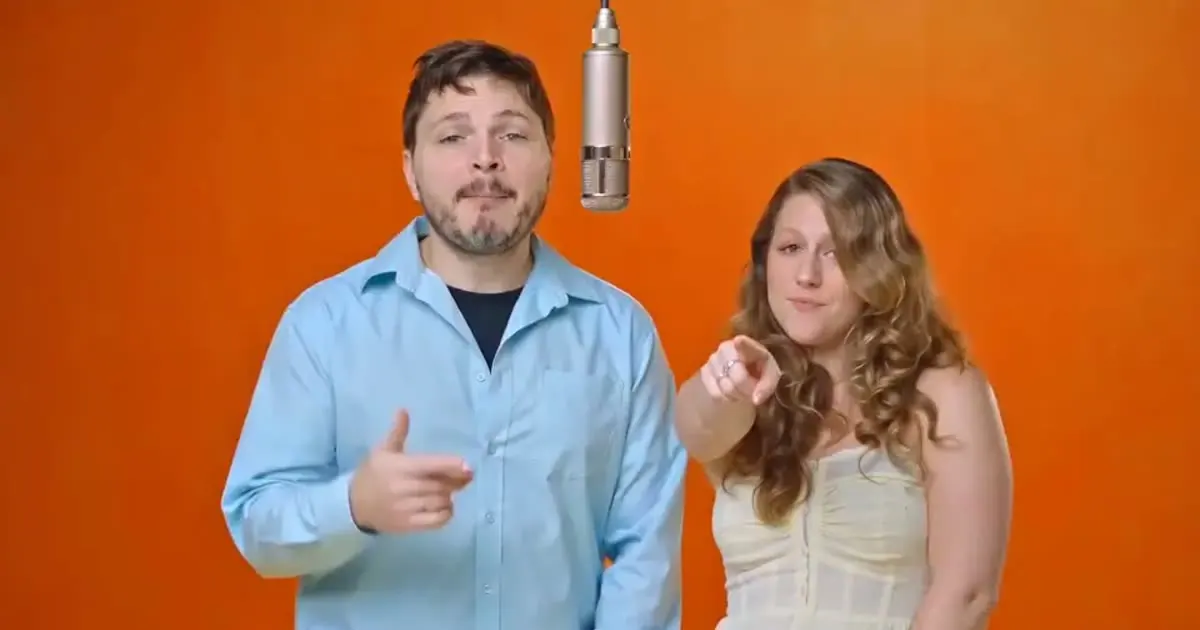
Hotel Lobby Video AI creates a trend-style hotel-lobby music clip from two photos. Place one person on the left and one on the right, and the tool generates a 15-second vertical or horizontal video where both appear at a single hanging microphone, trading verses back to back. The orange studio set stays the same while your photos drive the faces, hairstyles, and outfits.
Key features include picking a video shape (such as 9:16 for portrait or 16:9 for landscape) and rendering a clip in 768p for 15 seconds. Your input photos are used to keep the left photo on the left side of the mic and the right photo on the right side. Lighting is rebuilt to match the orange studio look, and the final download includes the beat and timed voices.
This is made for pairs—friends, partners, siblings, or family—plus occasional experiments with pets or cartoon characters. For best results, use solo, front-facing photos with soft, even lighting (like daylight or a bright room), and keep the head and upper outfit area clearly visible. If your first take feels off, re-run to get a different render.
Pricing uses credits: each 15-second render at 768p with sound costs 60 credits. There’s no subscription, renders are typically ready in about 2–3 minutes, and you won’t be charged if the render fails.
What does Hotel Lobby Video AI generate from my two photos?
A 15-second hotel-lobby-style rap clip in an orange studio where the left photo becomes the left person and the right photo becomes the right person, both at the same hanging microphone.
How many photos do I need, and how should I place them?
Use two photos total: one solo face for the Left Rapper and one solo face for the Right Rapper. The left photo stays on the left side of the mic, and swapping photos swaps sides.
Does the video include sound, or do I need to add music later?
The downloaded clip includes the beat and timed voices. You can mute it or overlay your own sound after you download, if you want.
What video size and length do I get?
Renders are 768p for 15 seconds. You can choose a shape such as 9:16 (portrait) or 16:9 (landscape).
How much does a render cost, and are there subscriptions?
A 15-second render with sound costs 60 credits. There’s no subscription, and typical render time is about 2–3 minutes.
What if a render fails—will I be charged?
No. You won’t be charged if the render fails.
This listing is claimed
Own Hotel Lobby Video AI? Sign in with the email used to claim it to manage this listing, or upgrade to Pro for featured-first placement and a newsletter feature.