Genjutsu AI
AI Video Maker Generators & Tools
Genjutsu AI generates publishable Shorts, Reels, and ads by keeping motion and timing from viral templates or your footage while restyling the look.
What does Genjutsu AI do?
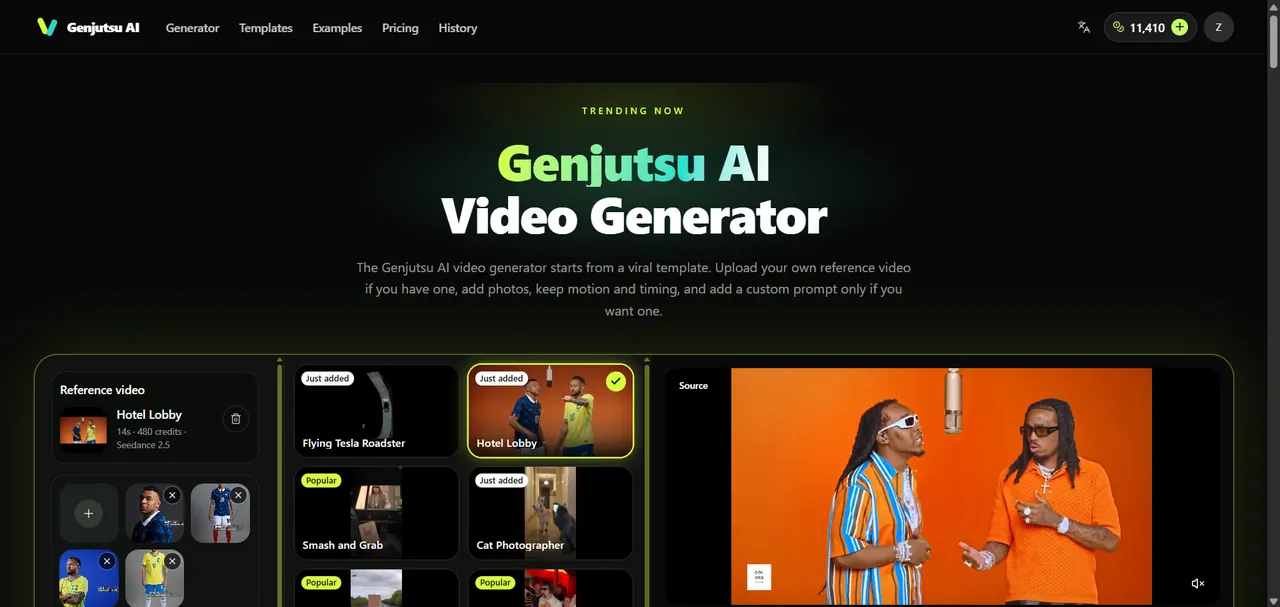
Genjutsu AI is an AI video generator built for publishable Shorts, Reels, and ad cuts. Your workflow starts with a viral template that already has proven motion, or you can upload your own reference video when you need continuity from footage you already shot. Then you add photos to define what should appear—such as products, people, or wardrobe—and (optionally) a custom prompt for what should change.
The key idea is control: Genjutsu AI keeps the motion and timing locked while rebuilding the rest of the scene around that take. That means you can swap set styling, wardrobe, packaging, or the overall atmosphere while protecting the choreography, camera intent, and delivery you approved. You preview, download, and use the generated variants as channel-ready assets.
Genjutsu AI is designed for growth marketers who need market tests without repeated reshoots, music and performance creators who want multiple looks from one take, solo creators upgrading real footage, and agencies iterating with teams until creative signs off. It’s also useful when you have a specific motion to preserve—ads that must keep the same delivery, Shorts that must keep the same dance timing, or localized variants that must keep the same camera move.
Plans are credit-based with monthly or yearly subscriptions, plus one-time credit packs. The Lite plan is $8.9/month billed monthly ($9.9/month equivalent billed yearly), Pro is $16.9/month billed monthly ($19.9/month equivalent billed yearly), and Ultra is $32.9/month billed monthly ($39.9/month equivalent billed yearly). Credit packs are valid for one year, subscriptions renew automatically and can be canceled anytime.
What is Genjutsu AI video generation based on—text, templates, or my footage?
It’s built around viral templates for motion and timing, with the option to upload your own reference video when you need continuity. You can add photos to define what appears, and use a custom prompt only if you want additional guidance.
How do I keep the same motion and timing while changing the look?
Start from a viral template or your reference clip, then add photos (and optionally a custom prompt) for what should change. Genjutsu AI keeps choreography and camera intent while restyling scene, wardrobe, product presentation, or atmosphere.
What files can I upload as a reference video?
You can upload an MP4, WEBM, or MOV clip up to 500 MB. Reference clips are typically 4–30 seconds with clear subject motion and stable framing.
How many photos can I add, and what should they contain?
You can add up to 5 photos, with each image up to 20 MB. Use photos of people, products, or clothes to define what should appear in the generated result.
Do I need a custom prompt to get good results?
No. A viral template plus photos is enough for many outcomes. Add a custom prompt when you want to specify what must stay locked versus what may change.
What plan options are available and how does credit billing work?
Plans are credit-based with monthly or yearly subscriptions and one-time credit packs. Generation shows the credit cost before you run it, and failed generations return credits automatically; subscriptions renew automatically and can be canceled anytime.
This listing is claimed
Own Genjutsu AI? Sign in with the email used to claim it to manage this listing, or upgrade to Pro for featured-first placement and a newsletter feature.