
Eziclip
AI Video Maker Generators & Tools
Eziclip is an open-canvas video editor where you and your AI can edit side by side and export multiple formats from one project.

- Pricing
- Free
- Category
- Video
- Listed
- Aug 27, 2026
- Updated
- Aug 28, 2026
Promoted
 RewindType any X/Twitter handle. Get their year back as a narrated video story. Then ask it anything.
 KurodyneSell the tools from your AI side projects. Listing is free.
 Sidrune AI85% off. Stable Claude API for agent developers. Pay as you go. Invoices & refunds available.
 Pixmax.aiPixmax.ai is an all-in-one AI workspace for videos, visual stories, and marketing content.
 SEOify - Improve your SEO & rankingsBuild links to rank in Google. Improve your DR with links you can start building now.Advertise here270,000+ people visit Dang.ai every month.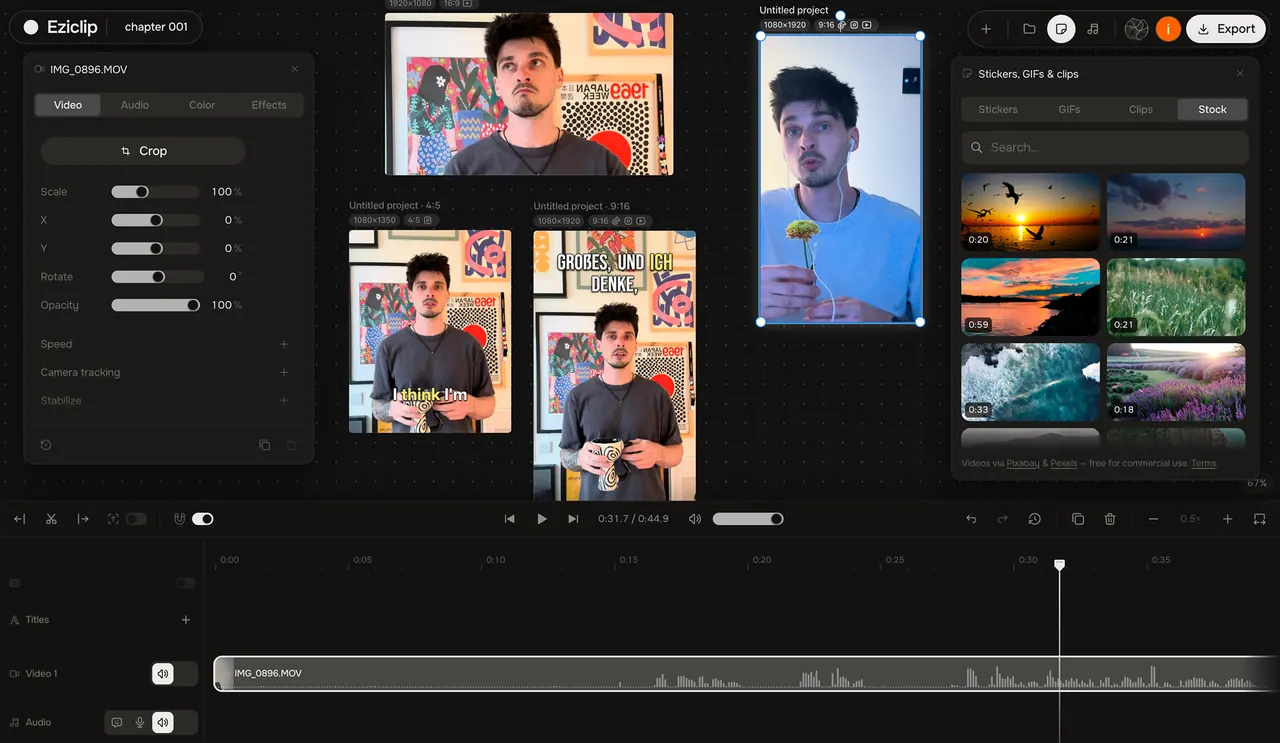
What does Eziclip do?
Eziclip is an open-canvas video editor built for creators working alone or with an AI. Instead of treating your project as a single clip, it organizes each project as a board where multiple versions—like a long cut plus verticals and teasers—sit side by side and export together.
Bring your AI into the workflow by connecting the AI you already use, then collaborate directly on the board. You can cut by text, generate timed captions, apply AI color grading, enhance voices, create voiceovers from typed scripts, and more—while retaining full control to stop, undo, or take over at any time.
Beyond AI editing, Eziclip includes a studio-grade toolset for common creator tasks: stabilizing, camera/body tracking, cleaning audio, keyframes, titles and text, transitions, resizing for social (like 9:16, 1:1, and 16:9), snapping to the beat, and exporting MP4, MP3, and subtitles (SRT/VTT). You can also use quick creator tools in-browser for fast captions, cleanup, and enhancements—without installing software.
What does “open-canvas” mean in Eziclip?
Your project lives on a board-style canvas where multiple clips and formats are arranged side by side, so you can edit and export them together.
Can I edit multiple social formats from one project?
Yes. Eziclip lets you keep different aspect ratios and versions on the same board (e.g., 16:9, 9:16, and 1:1) and export them together.
How do “cut by text” and captions work?
You can delete a word and the cut closes around it. Captions can be auto-transcribed and timed to the voice, then burned in or exported as SRT/VTT.
Which AI can I connect to help with editing tasks?
You can connect AI such as Claude, ChatGPT, Cursor, or any MCP agent to handle editing tasks on your board.
Can I generate a voiceover or enhance a voice in Eziclip?
Yes. You can type a script to generate a voiceover, and you can use a voice enhancer to clean up a noisy track in one pass.
What can I export from Eziclip?
You can export MP4 video, MP3 audio, and subtitles in SRT or VTT formats, with browser rendering and social-friendly resizing options.
This listing is claimed
Own Eziclip? Sign in with the email used to claim it to manage this listing, or upgrade to Pro for featured-first placement and a newsletter feature.