
Cursor
AI Agents
Cursor is an AI coding agent that turns prompts into plans, code, and review-ready changes across desktop and CLI workflows.
- Category
- AI Agents
- Listed
- Oct 18, 2026
- Updated
- Oct 19, 2026
Promoted
 AI Checker PlusAI detector that highlights which passages AI wrote. Free check, no sign-up. Plagiarism too.
 RewindType any X/Twitter handle. Get their year back as a narrated video story. Then ask it anything.
 KurodyneSell the tools from your AI side projects. Listing is free.
 Sidrune AI85% off. Stable Claude API for agent developers. Pay as you go. Invoices & refunds available.
 Pixmax.aiPixmax.ai is an all-in-one AI workspace for videos, visual stories, and marketing content.
 SEOify - Improve your SEO & rankingsBuild links to rank in Google. Improve your DR with links you can start building now.Advertise here330,000+ people visit Dang.ai every month.
What does Cursor do?
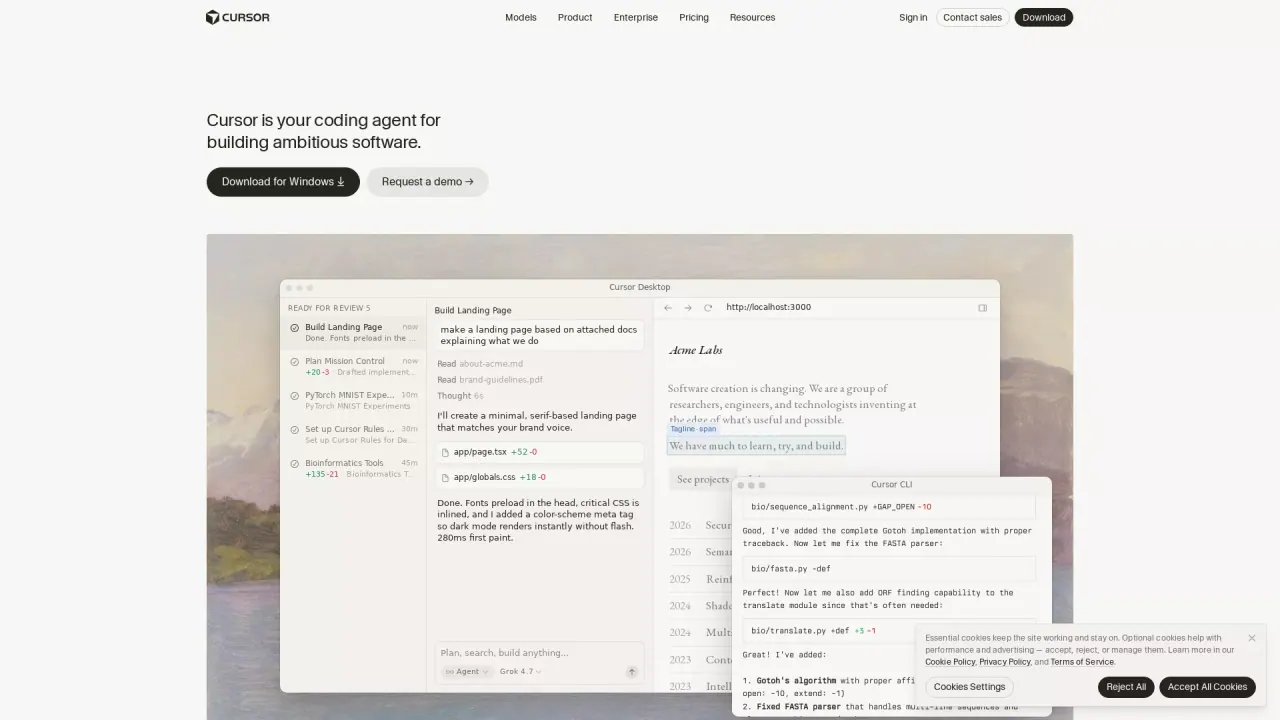
Cursor is your coding agent for building ambitious software. Instead of only providing suggestions, it helps you accelerate development by handing off tasks so you can stay focused on key decisions—planning what to build, generating implementation work, and iterating through review.
You can use Cursor in multiple ways, including a desktop IDE experience and a command-line (CLI) workflow. It supports agent-style development that turns prompts and relevant context into actionable plans, then follows through with targeted edits or broader autonomous workflows for end-to-end feature work.
For larger efforts, Cursor also offers cloud agents that work in parallel. These agents run on their own computers to build, test, and demo features for you to review over hours or days. Cursor also includes supporting collaboration and review-oriented tooling, including the ability to run in your terminal, collaborate in Slack, and review PRs in GitHub with bots that can sign in to your tools and return finished work.
Cursor can help with code review support, intelligent navigation, and context-aware assistance. Model selection is supported across cutting-edge providers. Pricing details aren’t specified here; you can download Cursor for Windows or request a demo for enterprise needs.
What is Cursor used for?
Cursor is used to build software faster by turning tasks into plans and code changes. It can help you go from idea to implementation and through review cycles so you can iterate efficiently.
Can I use Cursor in both a desktop IDE and the command line?
Yes. Cursor supports a desktop IDE experience as well as a CLI workflow, so you can run agent tasks from your terminal when that fits your process.
What are cloud agents in Cursor?
Cloud agents work autonomously in parallel on bigger tasks. They run on their own computers to build, test, and demo features for you to review.
How autonomous can I make the agent?
You can choose between targeted, command-driven edits and broader autonomous agentic workflows. This lets you control how much independence the agent has on a given task.
Does Cursor support team collaboration and review workflows?
Yes. Cursor describes workflows that run in your terminal, collaborate in Slack, and help with PR review in GitHub. It can also use bots that sign into your tools to return finished work.
Where can I find pricing for Cursor?
Pricing details aren’t included in the provided text. You can download Cursor for Windows or request a demo for enterprise needs.
Is this your tool?
Claim Cursor to manage this listing, or upgrade to Pro for featured-first placement and a newsletter feature.