Artcraft AI
AI Image Generators from Text Tools
Artcraft AI is a browser-based image and video studio where you describe what you want or upload a photo to generate and download results.
Promoted
 AI Checker PlusAI detector that highlights which passages AI wrote. Free check, no sign-up. Plagiarism too.
 RewindType any X/Twitter handle. Get their year back as a narrated video story. Then ask it anything.
 KurodyneSell the tools from your AI side projects. Listing is free.
 Sidrune AI85% off. Stable Claude API for agent developers. Pay as you go. Invoices & refunds available.
 Pixmax.aiPixmax.ai is an all-in-one AI workspace for videos, visual stories, and marketing content.
 SEOify - Improve your SEO & rankingsBuild links to rank in Google. Improve your DR with links you can start building now.Advertise here330,000+ people visit Dang.ai every month.
What does Artcraft AI do?
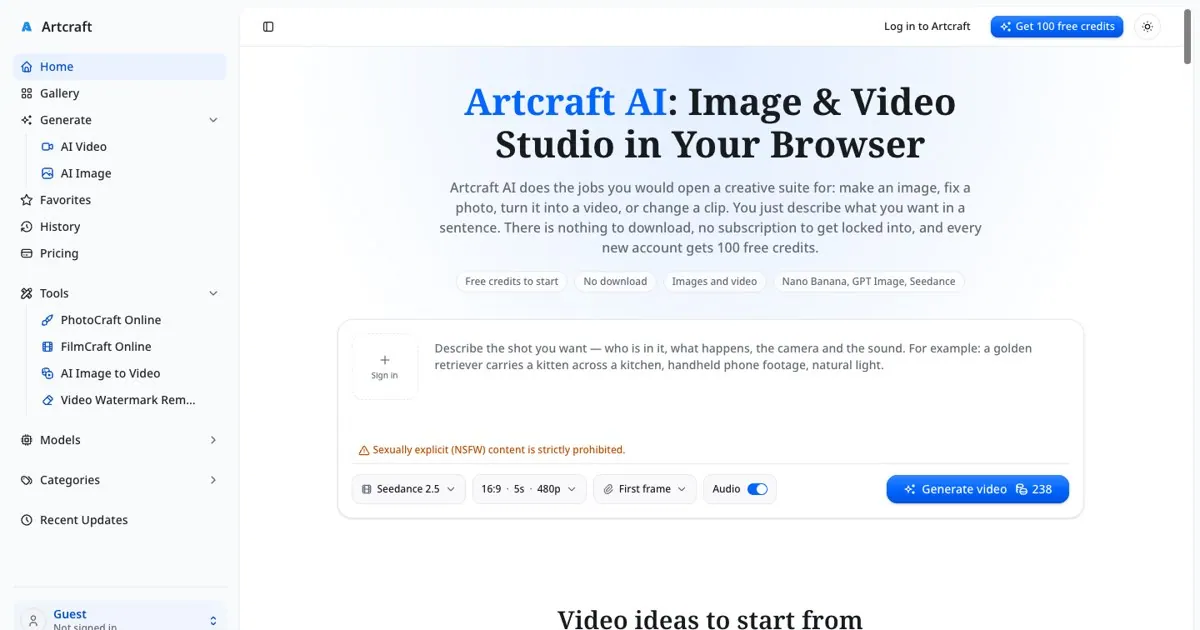
Artcraft AI is an online studio for creating and editing AI images and videos in your browser—no downloads, no desktop setup. You can type a prompt to generate new visuals, or upload your own photo and describe how you want it changed. Model options like Nano Banana Pro, GPT Image 2, Seedance 2.5, and H3 Max Turbo help you get different styles and video behaviors.
For images, PhotoCraft Online edits by instruction. Remove backgrounds, clear people out of a shot, swap the sky, or fix lighting without needing layers or masks. You can start from text alone or upload photos (including combining up to four photos for editing or composition), with outputs designed for common creative needs like product shots, posters, thumbnails, and social graphics.
For video, FilmCraft Online supports text-to-video, photo-to-video, and clip editing. Generate short clips with sound, animate a still photo while keeping faces, outfits, and products consistent, or change a short clip by describing what should be different. There’s also a Video Watermark Remover for clips you own, removing watermark, logo, or caption painted out even as content moves.
Artcraft AI is free to start: new accounts get 100 free credits with no card or subscription. Each image or clip costs credits based on model, size, and length; the credit cost is shown before you generate. If you want more, monthly plans start at $39/month for 5,000 credits (cancel anytime), or you can buy a one-time pack for $49 for 4,000 credits that never expire. Commercial use is included on every plan.
Do I need to download Artcraft AI to use it?
No—Artcraft AI runs in your browser on modern devices (including Windows, Mac, Linux, Chromebook, Android, and iPhone).
What can I make with Artcraft AI?
You can generate AI images, edit photos by describing the change, create videos from a text prompt or photo, edit short clips with a sentence, and remove watermarks from clips you own.
How do credits work on Artcraft AI?
You start with 100 free credits on a new account. Each generation uses credits, and the credit cost is shown before you generate; if a generation fails, credits come back automatically.
Can I make videos that include sound?
Yes. With supported models, generated clips can come back with their own sound (such as ambience, effects, movement, and speech).
Does Artcraft AI support Photoshop-like layer editing and PSD files?
Not for the web editor workflow—PhotoCraft Online works on flat images (JPG, PNG, WebP, HEIC). Layered PSD files aren’t supported.
Is it allowed to use what I create for client work or ads?
Yes. Commercial use is included on every plan, including the free tier.
This listing is claimed
Own Artcraft AI? Sign in with the email used to claim it to manage this listing, or upgrade to Pro for featured-first placement and a newsletter feature.