
aiimg.me
AI Image Generators from Text Tools
aiimg.me is a free AI image generator and editor where you can create from text or transform references in one workspace.
- Pricing
- Free
- Category
- Image
- Listed
- Sep 1, 2026
- Updated
- Sep 1, 2026
Promoted
 Pixmax.aiPixmax.ai is an all-in-one AI workspace for videos, visual stories, and marketing content.
 AI Checker PlusAI detector that highlights which passages AI wrote. Free check, no sign-up. Plagiarism too.
 RewindType any X/Twitter handle. Get their year back as a narrated video story. Then ask it anything.
 KurodyneSell the tools from your AI side projects. Listing is free.
 Sidrune AI85% off. Stable Claude API for agent developers. Pay as you go. Invoices & refunds available.
 SEOify - Improve your SEO & rankingsBuild links to rank in Google. Improve your DR with links you can start building now.Advertise here270,000+ people visit Dang.ai every month.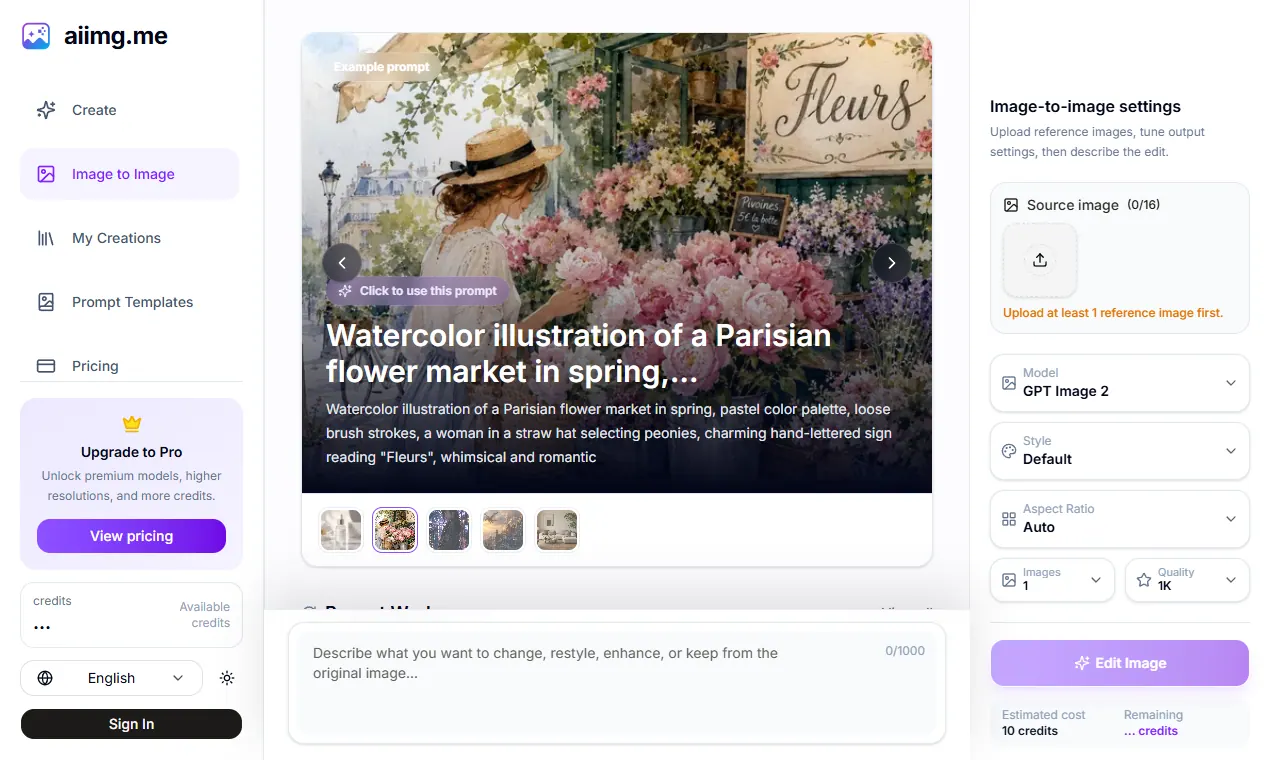
What does aiimg.me do?
aiimg.me is an all-in-one browser workspace for creating AI images—starting from text (text to image) or from an uploaded reference (image to image). You can iterate in the same place by choosing a model, style, ratio, and output count, then comparing results side by side before refining the direction.
Use text to image when your concept exists only in words and you want creative freedom. Describe the subject first, then add environment, composition, lighting, mood, materials, and format so the model has clearer priorities. When you already have a visual direction, switch to image to image to transform a photo, illustration, render, or generated result with reference-led changes like new backgrounds, styles, materials, seasons, lighting, or atmosphere.
aiimg.me also includes prompt templates and a “My Creations” history area so you can review, reuse prompts and settings, and return to earlier versions. Optional tools like photo-to-line-art help you quickly create line drawings and sketches from an uploaded image. Note that outputs can reinterpret details (including faces, hands, logos, small text, and fine geometry), so focused instructions and clear references are key.
Is aiimg.me a free AI image generator?
Yes—aiimg.me provides a free AI image generator experience in your browser. Free-credit outputs may include a watermark, and an estimated credit cost is shown before each task.
Do I need to sign up or log in to create images?
No signup is needed to start creating in the free workspace. You can begin immediately and continue refining your visual in the same flow.
What can I use as input: text or images?
You can generate from text (text to image) or transform an uploaded reference (image to image). You can also turn a photo into line art using the photo-to-line-art workflow.
What is image to image AI, and when should I use it?
Image to image AI transforms an existing image using it as a visual reference. Use it when you want to keep recognizable structure (like subject, pose, or composition) while changing background, style, materials, lighting, or mood.
Can I reuse prompts or settings after generating?
Yes. Your creations are saved in “My Creations,” where you can review results, download images, and reuse prompts and settings from your creation history.
Does the editor keep identity, logos, and small details exactly the same?
No. Reference-led edits create a fresh image from the reference and your instruction, so faces, hands, logos, small text, and fine geometry may be reinterpreted. For continuity-critical work, keep the change focused and review multiple options.
This listing is claimed
Own aiimg.me? Sign in with the email used to claim it to manage this listing, or upgrade to Pro for featured-first placement and a newsletter feature.