
AIBroll
AI Video Maker Generators & Tools
AIBroll turns your script into motion design B-roll—kinetic type, animated charts for numbers, and icon motion—exported as MP4 clips ready to cut.
- Pricing
- Free
- Category
- Video
- Listed
- Oct 6, 2026
- Updated
- Oct 30, 2026
Promoted
 Pixmax.aiPixmax.ai is an all-in-one AI workspace for videos, visual stories, and marketing content.
 AI Checker PlusAI detector that highlights which passages AI wrote. Free check, no sign-up. Plagiarism too.
 RewindType any X/Twitter handle. Get their year back as a narrated video story. Then ask it anything.
 KurodyneSell the tools from your AI side projects. Listing is free.
 SEOify - Improve your SEO & rankingsBuild links to rank in Google. Improve your DR with links you can start building now.Advertise here330,000+ people visit Dang.ai every month.
What does AIBroll do?
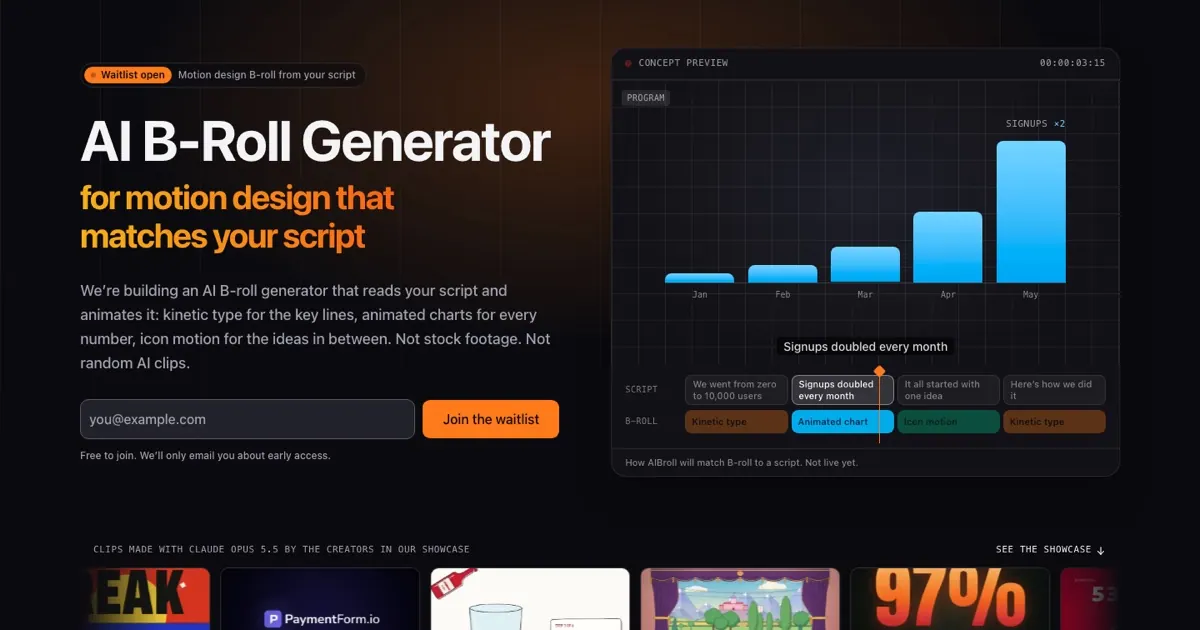
AIBroll is an AI B-roll generator focused on motion design graphics that match what your script actually says. Instead of relying on keyword searching or generic stock-style clips, it animates your lines directly—so “revenue grew 40%” becomes a clip where the chart rises to 40%, right when that line is spoken.
The workflow is built for explainer-style videos where timing matters. Paste a voiceover script, an outline, or a transcript and each sentence becomes a slot on the timeline. Key phrases animate with kinetic type, numbers turn into animated charts and counters, and ideas fill in with icon motion—creating clear, consistent visual beats between your voiceover moments.
AIBroll is designed for creators who want clean motion graphics rather than camera footage. It’s well-suited for faceless YouTube and TikTok channels, educational explainers, ads and VSLs, and product or SaaS narration where features, proof, and results should appear on cue.
Exports are provided as MP4 clips in common aspect ratios (16:9, 9:16, and 1:1) so you can drop them into editors like Premiere Pro, Final Cut Pro, DaVinci Resolve, and CapCut. AIBroll is not live yet; join the free waitlist for early access. Pricing is not published yet.
What kind of B-roll does AIBroll generate?
AIBroll generates motion design B-roll such as kinetic typography for key lines, animated charts for numbers, and icon motion for the ideas between them.
Does AIBroll create visuals from my script, or from keywords?
It’s built to read your script line by line and animate what the words and numbers actually say, rather than matching loosely to keywords or pulling random clips.
Can I use AIBroll for faceless videos with just voiceover?
Yes. Since it starts from a script or transcript, it’s intended to support voiceover-only and faceless formats where you still need visuals aligned to each spoken beat.
What exports will I get, and what video editors can I use?
You’ll download MP4 clips in 16:9, 9:16, and 1:1. They’re meant to be used in editors like Premiere Pro, Final Cut Pro, DaVinci Resolve, and CapCut.
Is AIBroll live right now?
No. AIBroll is currently in development, and you’ll need to join the free waitlist to get early access when it opens.
Is joining the waitlist free, and will pricing be shared later?
Joining the waitlist is free and you’ll only be emailed about early access. Pricing hasn’t been published yet, and it will be shared before launch.
This listing is claimed
Own AIBroll? Sign in with the email used to claim it to manage this listing, or upgrade to Pro for featured-first placement and a newsletter feature.