AI Sora Watermark Remover
Verified
AI Watermark Remover
Remove Sora text overlays and semi-transparent logos in one click with fast, browser-based AI processing.
- Pricing
- Free trial
- Category
- Video
- Listed
- Nov 4, 2025
- Updated
- Nov 4, 2026
Promoted
 AI Checker PlusAI detector that highlights which passages AI wrote. Free check, no sign-up. Plagiarism too.
 RewindType any X/Twitter handle. Get their year back as a narrated video story. Then ask it anything.
 KurodyneSell the tools from your AI side projects. Listing is free.
 Sidrune AI85% off. Stable Claude API for agent developers. Pay as you go. Invoices & refunds available.
 Pixmax.aiPixmax.ai is an all-in-one AI workspace for videos, visual stories, and marketing content.
 SEOify - Improve your SEO & rankingsBuild links to rank in Google. Improve your DR with links you can start building now.Advertise here330,000+ people visit Dang.ai every month.
What does AI Sora Watermark Remover do?
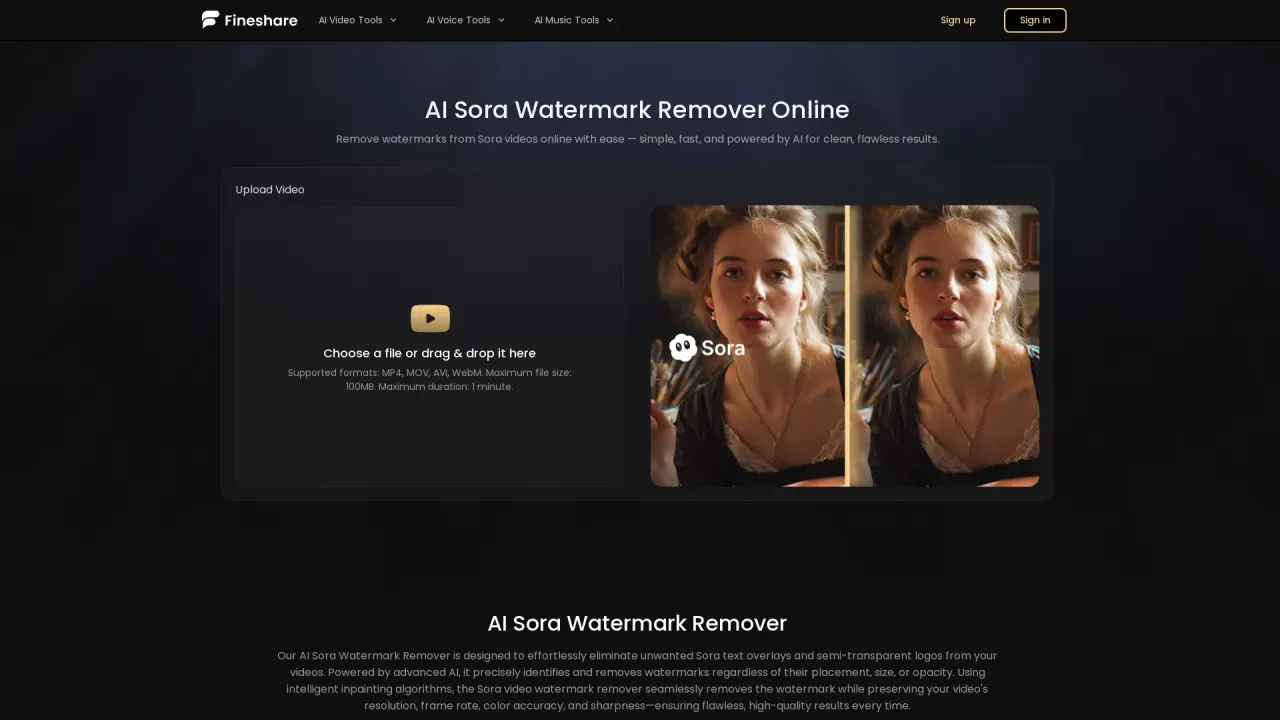
AI Sora Watermark Remover is an online tool that automatically detects and removes watermarks from Sora-generated videos. It targets both visible text overlays and semi-transparent logos, even when they appear in different areas of the frame.
Upload your video (or drag and drop it) and let the AI handle the rest—no manual marking required. The removal uses intelligent inpainting to create a seamless result while preserving important video characteristics such as resolution, frame rate, color accuracy, and sharp details. It also aims to keep frames consistent and avoid common artifact or blur issues.
This tool is designed for creators who want clean, polished videos without watermark distractions. It can be useful for social content, marketing materials, educational resources, business presentations, and personal projects—any situation where you need a watermark-free output.
The workflow runs directly in your browser, with no downloads or installations required. Processing typically takes about 1–2 minutes for short videos. Supported formats include MP4, MOV, AVI, and WebM, with a maximum file size of 100MB and a maximum duration of 1 minute. Free usage allows 1 task at a time, and free users’ videos are saved for 15 days. Free credits support processing up to 30 seconds, and additional credit purchases enable more watermark removal tasks. Only remove watermarks from content you own or have explicit permission to edit, and follow applicable copyright and Sora content policies.
What does the AI Sora Watermark Remover remove?
It removes unwanted Sora watermarks from videos, including text overlays and semi-transparent logos.
Does it work when the watermark is in different positions or has different opacity?
Yes. The AI detects watermarks across different placements, sizes, and transparency levels, so you don’t need to manually select the area.
Will removing the watermark reduce my video quality?
The tool uses intelligent inpainting to preserve key qualities like resolution, frame rate, color accuracy, and sharp details, aiming for a seamless result without obvious artifacts.
What file types and upload limits are supported?
Supported formats are MP4, MOV, AVI, and WebM. Uploads are limited to 100MB and up to 1 minute in duration.
How long does watermark removal take?
Processing typically takes about 1–2 minutes for short videos.
What are the free task and credit limits?
Free usage supports 1 task at a time, and free users’ videos are saved for 15 days. Free credits allow processing up to 30 seconds; additional credit purchases enable more tasks.
This listing is claimed
Own AI Sora Watermark Remover? Sign in with the email used to claim it to manage this listing, or upgrade to Pro for featured-first placement and a newsletter feature.