AI Watercolor Generator
AI Image Generators from Text Tools
Turn photos or text prompts into editable watercolor art, then refine faces, colors, paper texture, and composition through chat.
- Pricing
- Free
- Category
- Image
- Listed
- Sep 17, 2026
- Updated
- Sep 18, 2026
Promoted
 Pixmax.aiPixmax.ai is an all-in-one AI workspace for videos, visual stories, and marketing content.
 RewindType any X/Twitter handle. Get their year back as a narrated video story. Then ask it anything.
 KurodyneSell the tools from your AI side projects. Listing is free.
 Sidrune AI85% off. Stable Claude API for agent developers. Pay as you go. Invoices & refunds available.
 SEOify - Improve your SEO & rankingsBuild links to rank in Google. Improve your DR with links you can start building now.Advertise here270,000+ people visit Dang.ai every month.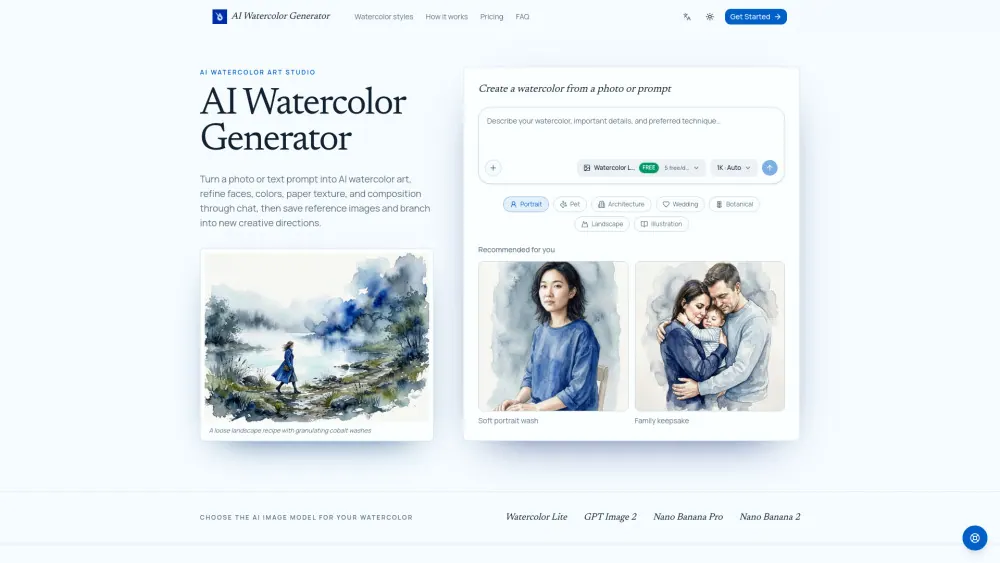
What does AI Watercolor Generator do?
AI Watercolor Generator is an AI watercolor art studio for creating paintings from a photo or a text prompt. You can convert portraits, pets, houses, storefronts, and wedding venues into recognizable watercolor artwork, or start fresh from an idea and generate an original scene.
Before generating, choose a watercolor direction (including editable prompt recipes), then set your image model, aspect ratio, and output resolution (1K, 2K, or 4K). The studio supports multiple model options beyond the free Watercolor Lite preset.
Refinement doesn’t stop after the first image. Continue editing through chat to adjust softness, pigment richness, background cleanliness, facial accuracy, and composition. For more precise control, you can mark a specific area in the image and request a targeted revision, while keeping earlier versions available in the same workspace.
A reusable asset library lets you save portraits, pets, buildings, brand elements, and other reference images for reuse without uploading them again. You can also branch into new creative directions from an existing conversation while preserving your original direction and image history.
Can I turn a photo into a watercolor painting?
Yes. Upload a portrait, pet, house, or venue photo, then generate a watercolor result while keeping the subject recognizable by describing what should stay accurate.
Can I create watercolor art from a text prompt instead of a photo?
Yes. Start with a written art direction or use an editable watercolor prompt recipe, then generate a new scene from scratch.
Do I have to use a watercolor prompt recipe?
No. Recipes are optional suggestions that add editable guidance to your prompt, but you can change them or write your own instructions from scratch.
How can I preserve accurate faces, pet markings, or architectural details?
Specify what must remain recognizable in your initial prompt, or mark the relevant area of a generated image and ask for a targeted revision through chat.
Can I edit the watercolor after it’s generated?
Yes. Use the conversation to request changes like softer edges, richer pigment, cleaner backgrounds, or more accurate details, and iterate on the same creative direction.
Is there a free option?
Yes. Free users can create five Watercolor Lite images per day at 1K resolution. Higher resolutions and other models use credits.
This listing is claimed
Own AI Watercolor Generator? Sign in with the email used to claim it to manage this listing, or upgrade to Pro for featured-first placement and a newsletter feature.