
WriteWithChorus
AI Songwriting Assistant
Unlock your songwriting potential with Chorus, the AI songwriting assistant.
- Category
- Music
- Listed
- Aug 4, 2023
- Updated
- May 25, 2026
Promoted
 Sidrune AI85% off. Stable Claude API for agent developers. Pay as you go. Invoices & refunds available.
 Pixmax.aiPixmax.ai is an all-in-one AI workspace for videos, visual stories, and marketing content.
 RewindType any X/Twitter handle. Get their year back as a narrated video story. Then ask it anything.
 KurodyneSell the tools from your AI side projects. Listing is free.
 SEOify - Improve your SEO & rankingsBuild links to rank in Google. Improve your DR with links you can start building now.Advertise here270,000+ people visit Dang.ai every month.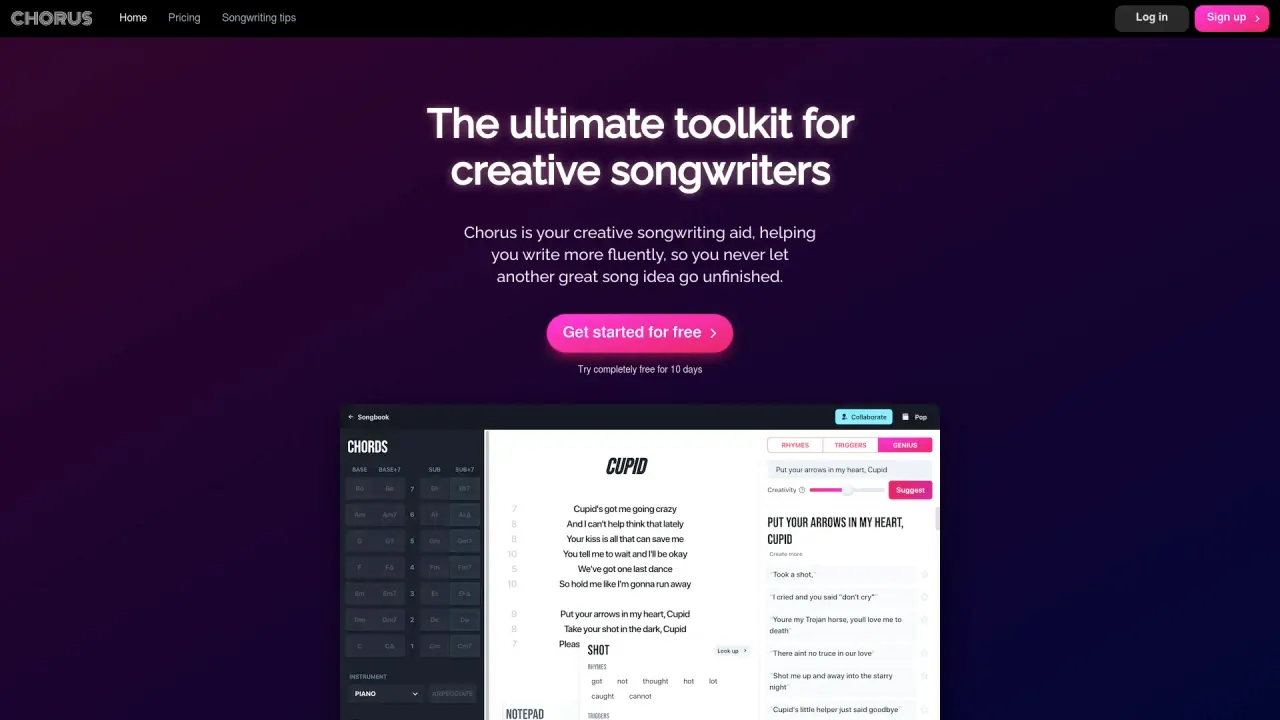
What does WriteWithChorus do?
What core features does WriteWithChorus offer for songwriting?
WriteWithChorus provides a suite of core tools to boost creativity and flow:
- Rhymes: finds natural, singable rhymes for your lyrics without switching tabs.
- Triggers: genre-tailored words to kick off your next line or verse.
- Genius: give a lyric, word, or phrase and get fresh ideas to keep momentum going.
- Chords: discover chords and progressions from a starting point and hear them in context.
- Collaboration: real-time collaborative writing sessions with other writers.
- Plus: Syllable counter, Syllable filters, Private notepad, Chords keyboard control, Instant dictionary on hover, Instant installable app, responsive design, and a sensitive content filter.
How can WriteWithChorus help me improve my songwriting skills?
WriteWithChorus supports skill development through:
- Lyric enhancement with Genius and Rhymes for more coherent and fitting lines.
- Chord exploration with the Chords feature to experiment with sounds.
- Educational resources like tips and tutorials to learn new techniques.
- Real-time collaboration to receive feedback and gain fresh perspectives.
Can I collaborate with others in real time?
Yes. WriteWithChorus offers collaborative writing sessions that enable live, real-time collaboration with other writers.
What is a Songbook in WriteWithChorus, and can I export songs as PDF or CSV?
Yes. You can create an organized Songbook to centralize your lyrics and chords, and export songs as PDF or CSV for sharing and archiving.
On which devices can I use WriteWithChorus, and is there an installable app?
WriteWithChorus works on all devices with a responsive design, and there is an instant installable app available for quick setup.
Which genres does WriteWithChorus support, and can prompts be tailored to my genre?
Chorus includes a sample of genres such as Pop, Rap, Singer-songwriter, and Country, with triggers and prompts tailored to your genre. There are more genres beyond the listed ones.
What other writing aids does WriteWithChorus provide?
Beyond the core tools, WriteWithChorus offers:
- Syllable counter (counts syllables)
- Syllable filters (shape suggestions by syllable constraints)
- Genius creativity slider (adjust the intensity of ideas)
- Private notepad
- Chords keyboard control
- Instant dictionary on hover
- Sensitive content filter
How do I use Syllable Counter, Syllable Filters, and the Dictionary feature?
- Syllable Counter helps you track syllable counts in your lines.
- Syllable Filters refine suggestions based on syllable constraints.
- Hover over words to access the Instant Dictionary for quick definitions and synonyms.
Is there a sensitive content filter in WriteWithChorus?
Yes. WriteWithChorus includes a sensitive content filter to help manage content as you write.
Does WriteWithChorus offer a free trial or pricing plans?
Yes. New users can start with a no-cost 10-day trial. After that, pricing is based on a paid subscription (monthly or yearly).
Is there a demo I can try before signing up?
Yes. You can try a demo, and you can choose a genre (e.g., Pop, Rap, Singer-songwriter, Country) to see relevant prompts.
Is this your tool?
Claim WriteWithChorus to manage this listing, or upgrade to Pro for featured-first placement and a newsletter feature.