AI Photo Editor No Sign Up
AI Image Generators from Text Tools
Edit photos with natural-language AI prompts—no sign-up required.
- Pricing
- Free
- Category
- Image
- Listed
- Aug 14, 2026
- Updated
- Oct 16, 2026
Promoted
 Sidrune AI85% off. Stable Claude API for agent developers. Pay as you go. Invoices & refunds available.
 Pixmax.aiPixmax.ai is an all-in-one AI workspace for videos, visual stories, and marketing content.
 AI Checker PlusAI detector that highlights which passages AI wrote. Free check, no sign-up. Plagiarism too.
 RewindType any X/Twitter handle. Get their year back as a narrated video story. Then ask it anything.
 KurodyneSell the tools from your AI side projects. Listing is free.
 SEOify - Improve your SEO & rankingsBuild links to rank in Google. Improve your DR with links you can start building now.Advertise here270,000+ people visit Dang.ai every month.
What does AI Photo Editor No Sign Up do?
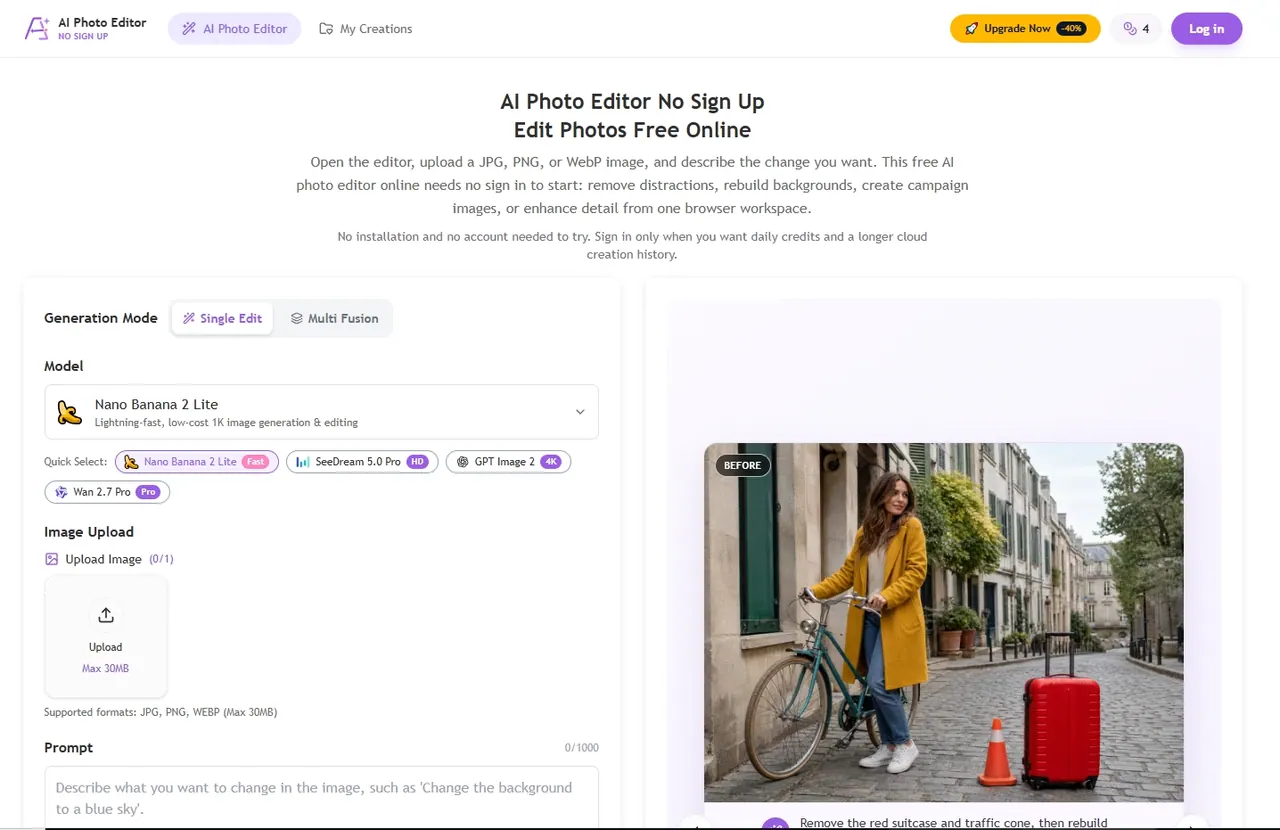
AI Photo Editor No Sign Up is a free, browser-based image editor for quick, high-impact photo changes without creating an account. Upload a JPG, PNG, or WebP image (up to 30MB), then describe what you want in natural language—such as removing distractions, rebuilding backgrounds, generating new content, enhancing detail, or changing styles.
Use it for common workflows like object removal, background replacement, and generative fill. The editor also includes tools for enhancing and upscaling so you can produce clearer, higher-resolution outputs for thumbnails, listings, social posts, slides, or presentations. You can choose an editing mode (Single Edit or Multi Fusion) and adjust aspect ratio and output resolution (options include 1K, 2K, and 4K) to match your destination.
Guest usage works directly in your browser with guest credits available without registration. Sign in only when you want daily credits and a longer cloud creation history. Guest history is temporary: “My Creations” keeps up to eight recent items for 24 hours.
Who it’s for: online sellers and solo founders making fast product drafts, content creators exploring campaign variations, students doing occasional edits, and small teams testing directions before committing to a longer workflow.
Do I need an account to start editing?
No—this editor runs in your browser and you can begin with guest credits without signing up. Sign in only if you want daily credits and longer cloud creation history.
What image formats and file sizes are supported?
You can upload JPG, PNG, or WebP images, up to 30MB per file.
What kinds of edits can I make without sign-in?
You can remove objects, replace or rebuild backgrounds, use generative fill, and enhance/upscale photos. Use clear prompts that describe what should change and what must stay the same.
How do guest creations and “My Creations” history work?
Guest “My Creations” keeps up to eight recent items for 24 hours. For longer account-linked history, sign in before generating.
How many credits do I get as a guest?
You start with free guest credits available in the editor, and generation uses credits (for example, generating images shows a credit cost).
What should I check before downloading an AI-edited photo?
Review edges, text, faces, shadows, and any brand/product markings. If something looks off, refine your prompt and try again rather than publishing immediately.
This listing is claimed
Own AI Photo Editor No Sign Up? Sign in with the email used to claim it to manage this listing, or upgrade to Pro for featured-first placement and a newsletter feature.