
Singify
Verified
AI Music Generator
Singify is an online AI song and music generator
- Pricing
- Free trial
- Category
- Music
- Listed
- Apr 14, 2025
- Updated
- May 25, 2026
Promoted
 AI Checker PlusAI detector that highlights which passages AI wrote. Free check, no sign-up. Plagiarism too.
 RewindType any X/Twitter handle. Get their year back as a narrated video story. Then ask it anything.
 KurodyneSell the tools from your AI side projects. Listing is free.
 Sidrune AI85% off. Stable Claude API for agent developers. Pay as you go. Invoices & refunds available.
 Pixmax.aiPixmax.ai is an all-in-one AI workspace for videos, visual stories, and marketing content.
 SEOify - Improve your SEO & rankingsBuild links to rank in Google. Improve your DR with links you can start building now.Advertise here270,000+ people visit Dang.ai every month.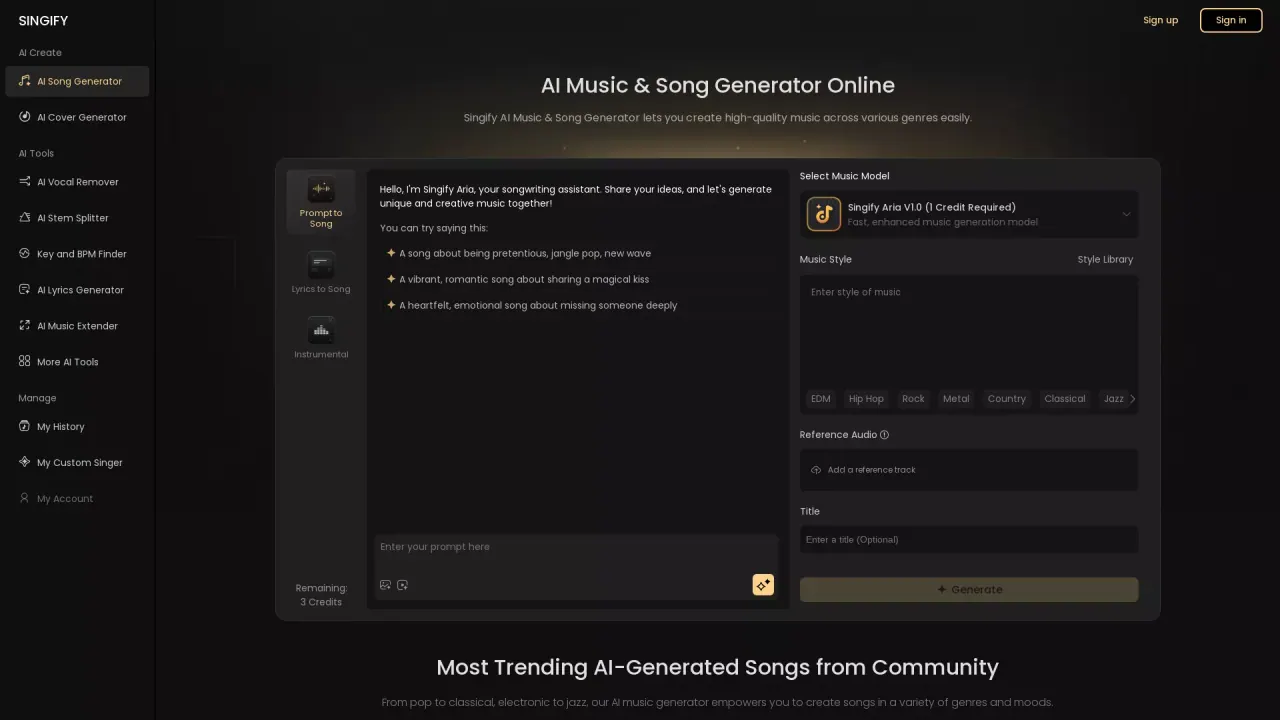
What does Singify do?
How can I turn text ideas into a full song with Singify?
You can create songs from prompts (Prompt to Song), from your own lyrics (Lyrics to Song), or as an instrumental backing track. You can also use Text to Music or Image to Music to turn text or visuals into melodies. Pick an AI music model (e.g., Aria V1.0, Aria S1.0, Aria V2.0), choose a music style, select an AI singer, optionally add a reference audio, and then generate. After generation, you can preview, tweak lyrics, style, or model, and generate additional versions. Export options include high-quality MP3 or FLAC, and stems for DAW editing. Songs can run up to about 4–4.5 minutes.
Does Singify offer a background music feature and is it royalty-free for commercial use?
Yes. Singify includes an AI Background Music Generator to create custom background tracks tailored to your video, audio, or image content. All AI-generated music is 100% royalty-free for unlimited use, suitable for commercial and personal projects.
What generation modes does Singify offer?
Singify supports multiple modes:
- Prompt to Song: generate from a mood or theme described in text.
- Lyrics to Song: generate a song from your own lyrics.
- Instrumental: create a backing track without vocals.
Additionally, you can use Text to Music and Image to Music to transform prompts or visuals into music.
Can I customize the AI voice or clone a voice?
Yes. Singify provides a Diverse AI Singer library and a Make AI Singer feature to clone a custom voice. You can also refine vocal results by providing a Reference Audio to guide style and delivery.
Do I need to be a musician to use Singify, and how fast is generation?
No musical background is required. Singify is designed for users of all levels. Generation is fast, and you can produce complete songs up to around 4–4.5 minutes in a single run.
What formats can I export the final track in?
You can download your finished track as MP3 or FLAC. If you need it for further editing, you can also export stems for DAW workflows.
How does the credit system work?
Generation uses credits. For example, selecting the Aria V1.0 model costs 1 Credit. Your account shows a credit balance (e.g., Remaining: 3 Credits). You can start for free when you sign up, with no credit card required.
Does Singify support languages other than English?
Yes. Singify offers multilingual support for prompts, lyrics, and vocal delivery, enabling non-English inputs and outputs where applicable.
What other AI tools are included in Singify?
In addition to the core song generator, Singify provides tools such as:
- AI Lyrics Generator
- AI Cover Generator
- AI Stem Splitter
- AI Music Extender
- AI Vocal Remover
- AI Reverb Remover
- AI Music Transcription
- Key and BPM Finder
- Audio to MIDI
- Acapella Extractor
How can I use a reference audio to influence the generated track?
You can upload or provide a reference audio track. The AI analyzes the reference’s melody, rhythm, and vocal tone to help shape the new song, keeping it cohesive with the input style.
Is Singify suitable for professional music production?
Singify is designed to support a wide range of creative workflows, from hobbyist to professional use. It offers high-quality AI-generated music, stems, and export options that can seed or complement professional productions.
Does Singify support prompts or lyrics in languages other than English?
Yes. Singify supports multilingual input and reception, enabling prompts and lyrics in multiple languages and voices.
Can I try Singify for free or without a credit card?
Yes. You can start for free when you sign up, and no credit card is required to begin.
This listing is claimed
Own Singify? Sign in with the email used to claim it to manage this listing, or upgrade to Pro for featured-first placement and a newsletter feature.