AI Motion Transfer
AI Video Maker Generators & Tools
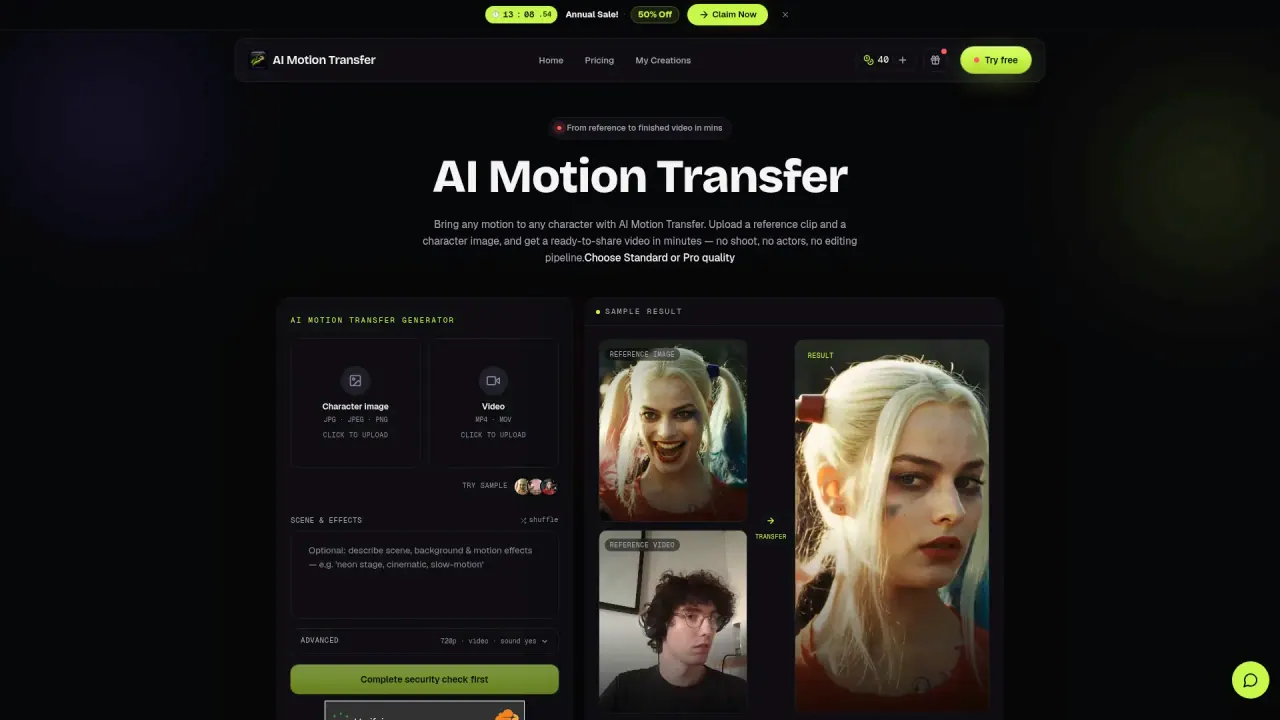
AI Motion Transfer maps your reference dance, walk, or gesture onto any character image and generates a downloadable MP4 in minutes.
- Category
- Video
- Listed
- Oct 14, 2026
- Updated
- Oct 29, 2026
Promoted
 Sidrune AI85% off. Stable Claude API for agent developers. Pay as you go. Invoices & refunds available.
 Pixmax.aiPixmax.ai is an all-in-one AI workspace for videos, visual stories, and marketing content.
 AI Checker PlusAI detector that highlights which passages AI wrote. Free check, no sign-up. Plagiarism too.
 RewindType any X/Twitter handle. Get their year back as a narrated video story. Then ask it anything.
 KurodyneSell the tools from your AI side projects. Listing is free.
 SEOify - Improve your SEO & rankingsBuild links to rank in Google. Improve your DR with links you can start building now.Advertise here270,000+ people visit Dang.ai every month.
What does AI Motion Transfer do?
AI Motion Transfer helps you create new character videos by mapping a reference motion onto the character you provide. Upload a reference clip (MP4 or MOV) and a character image (JPG, JPEG, or PNG), then generate a clean, ready-to-share MP4—without studio shoots, actors, mocap, or a post-edit pipeline.
You can choose Standard (720p) or Pro (1080p) quality based on how polished you need the output to be. The tool estimates render time and shows your AI credit cost before you generate, so you can control what you spend. Most generations complete in about 3–10 minutes, and you can download the result after processing.
There are also input limits to plan around: character image references support up to 10 seconds, while character video references support up to 30 seconds. Use AI Motion Transfer for quick variations and social-ready clips, then share to platforms like TikTok, Instagram Reels, YouTube Shorts, and more, or keep your generations private with saved history until you delete it.
Pricing is credit-based within subscription plans. You can start with a free offer of 40 credits valid for 7 days (no credit card). Paid plans include Starter ($10/mo billed $114 yearly), Creator ($25/mo billed $294 yearly), and Agency ($50/mo billed $594 yearly), with commercial usage included for the Creator and Agency tiers.
What does AI Motion Transfer do?
It takes a reference motion (dance, walk, or gesture) and maps it onto a character you provide, then generates a downloadable MP4.
What do I need to generate a motion transfer?
Upload a reference video (MP4 or MOV) and a character image (JPG, JPEG, or PNG). You can also use a character video reference with longer clip support.
How long does a motion transfer take?
Most generations finish in about 3–10 minutes. You’ll see a render time estimate before you generate.
What quality options are available?
You can generate in Standard (720p) or Pro (1080p). Your credit cost depends on the quality mode and the reference duration.
What’s the maximum length of my reference clip?
Character image references support up to 10 seconds, while character video references support up to 30 seconds.
Can I use the outputs commercially?
Paid outputs for the Creator and Agency plans include commercial usage rights for ads, campaigns, and client work.
This listing is claimed
Own AI Motion Transfer? Sign in with the email used to claim it to manage this listing, or upgrade to Pro for featured-first placement and a newsletter feature.