AIImageAgent
AI Image Generator
AI-Image-Agent generates images from text or transforms uploaded photos using selectable models, resolutions, formats, and aspect ratios.
Promoted
 KurodyneSell the tools from your AI side projects. Listing is free.
 Sidrune AI85% off. Stable Claude API for agent developers. Pay as you go. Invoices & refunds available.
 Pixmax.aiPixmax.ai is an all-in-one AI workspace for videos, visual stories, and marketing content.
 RewindType any X/Twitter handle. Get their year back as a narrated video story. Then ask it anything.
 SEOify - Improve your SEO & rankingsBuild links to rank in Google. Improve your DR with links you can start building now.Advertise here270,000+ people visit Dang.ai every month.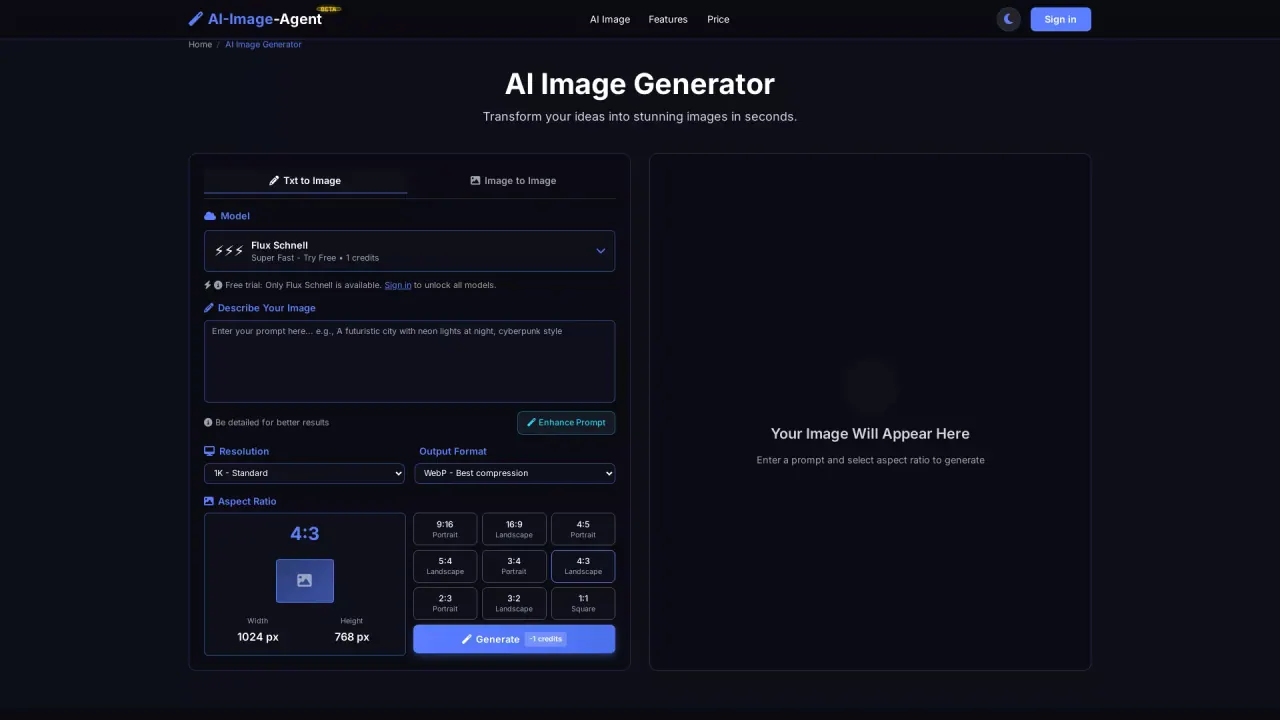
What does AIImageAgent do?
AI-Image-Agent (BETA) is an AI image generator built for quick creative transformations. You can create new images from a text prompt or upload a photo to generate an image-to-image result. With multiple selectable AI models, it’s designed to help you match the style and look you’re aiming for.
The workflow is simple: choose a model, add a detailed prompt or upload an image, then generate. You can refine the output with enhancements like resolution (1K/2K/4K), output format (JPG/PNG/WebP), aspect ratio (e.g., 1:1, 9:16 portrait, 16:9 landscape, and more), and standard image dimensions (such as 1024×768 and variants by aspect ratio). After processing, download your high-resolution result.
Built for speed and efficiency, AI-Image-Agent processes images in seconds using cloud compute and optimized neural networks. It also supports one-click transformation and multiple artistic styles, so you can experiment without editing expertise.
Usage requires signing in and costs credits (3 credits for generation). There is also a free trial option for the first time you sign in. If you want to process multiple images at once, batch processing is available on Pro and Ultra plans.
How do I generate an image with AI-Image-Agent?
Sign in, choose an AI model, then enter a text prompt or upload an image. Select your resolution, format, and aspect ratio, and click Generate—your result appears after processing.
Can I use AI-Image-Agent for text-to-image and image-to-image?
Yes. You can generate from a text prompt (Txt to Image) or upload a photo to transform it (Image to Image).
Is there a free way to try AI-Image-Agent?
Yes—there’s a free trial the first time you sign in. After that, generation requires credits.
How many credits does image generation cost?
Image generation requires 3 credits and sign-in is required to use the generator.
What output settings can I customize?
You can choose an AI model, add a detailed prompt (or use image input), set resolution (1K/2K/4K), pick an output format (JPG/PNG/WebP), and select an aspect ratio (including common portrait and landscape ratios).
Does AI-Image-Agent support batch processing?
Yes. Batch processing is available on Pro and Ultra plans so you can process multiple images at once.
This listing is claimed
Own AIImageAgent? Sign in with the email used to claim it to manage this listing, or upgrade to Pro for featured-first placement and a newsletter feature.