PictureToDrawing
AI Image Transformation
Transform Any Picture to Drawing with AI
Promoted
 Sidrune AI85% off. Stable Claude API for agent developers. Pay as you go. Invoices & refunds available.
 Pixmax.aiPixmax.ai is an all-in-one AI workspace for videos, visual stories, and marketing content.
 SEOify - Improve your SEO & rankingsBuild links to rank in Google. Improve your DR with links you can start building now.Advertise here270,000+ people visit Dang.ai every month.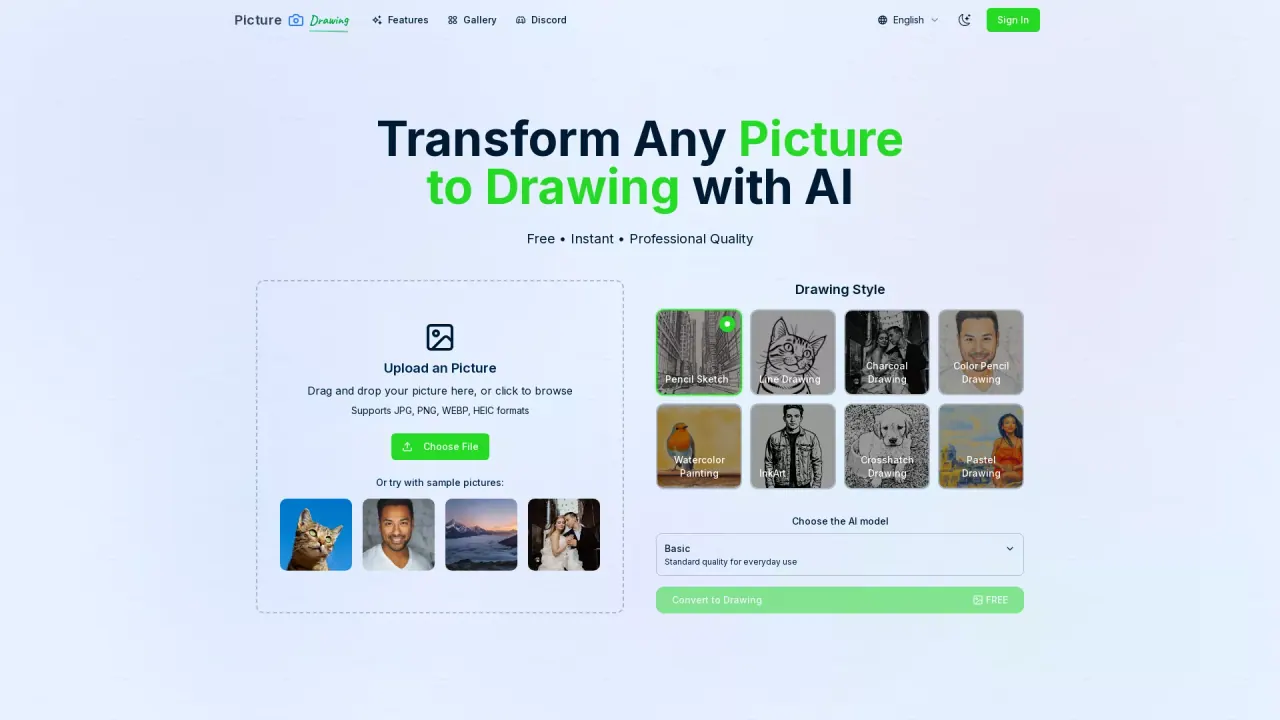
What does PictureToDrawing do?
What is Picture to Drawing AI and how does it work?
Picture to Drawing is an AI-powered tool that transforms any picture into a drawing with artistic results. Our advanced algorithm analyzes your photo and creates sketches, pencil drawings, and other artistic renditions in seconds.
Is Picture to Drawing AI free to use?
Yes. The tool is described as completely free to use with no hidden costs and no registration required. Free models may have longer generation times and occasional stability issues, while premium models are available for faster processing and enhanced reliability.
Do I need to create an account to use Picture to Drawing?
No registration is required. You can start using Picture to Drawing immediately without creating an account.
What image formats are supported for upload?
JPG, PNG, WEBP, and HEIC formats are supported.
What drawing styles are available?
Pencil Sketch, Line Drawing, Charcoal Drawing, Color Pencil Drawing, Watercolor Painting, InkArt, Crosshatch Drawing, and Pastel Drawing.
What AI models can I choose and how do they differ?
You can choose between Basic and Standard. Basic provides standard quality for everyday use, while Standard is described as the standard quality option for everyday use.
How long does the picture to drawing process take?
Processing time depends on the model you choose. Free models typically take 20–50 seconds, while premium models deliver results in about 5 seconds. Times may vary based on image size, complexity, and current server load.
What output resolution can I expect?
High-resolution output is available for your picture to drawing creations.
What types of images work best for picture to drawing conversion?
Portrait photos and images with clear subjects tend to produce the best results. The system handles various image formats and lighting conditions for optimal output.
How do I use Picture to Drawing AI?
Follow these steps:
- Upload Your Picture — choose any photo from your device (supported formats). 2) Select Drawing Style — pick your preferred artistic style. 3) Generate Your Drawing — click generate to create the artwork. 4) Download Result — save the drawing to your device and share.
Are there any limitations or issues with the free version?
Free models may have longer generation times and occasional stability issues. Premium models are available for faster processing and more reliable performance.
Is there a premium option and how does it work?
Yes. Premium models are available for enhanced quality and faster processing.
How can I contact support?
Email support@picturetodrawing.org for questions or assistance.
This listing is claimed
Own PictureToDrawing? Sign in with the email used to claim it to manage this listing, or upgrade to Pro for featured-first placement and a newsletter feature.