
PhotoEditorAI
Photography AI Tools
PhotoEditorAI is a free online AI photo editor that lets you upload an image and describe edits in plain English for fast results.
- Pricing
- Free
- Category
- Photography
- Listed
- Jun 12, 2026
- Updated
- Jun 12, 2026
Promoted
 Sidrune AI85% off. Stable Claude API for agent developers. Pay as you go. Invoices & refunds available.
 Pixmax.aiPixmax.ai is an all-in-one AI workspace for videos, visual stories, and marketing content.
 AI Checker PlusAI detector that highlights which passages AI wrote. Free check, no sign-up. Plagiarism too.
 RewindType any X/Twitter handle. Get their year back as a narrated video story. Then ask it anything.
 KurodyneSell the tools from your AI side projects. Listing is free.
 SEOify - Improve your SEO & rankingsBuild links to rank in Google. Improve your DR with links you can start building now.Advertise here270,000+ people visit Dang.ai every month.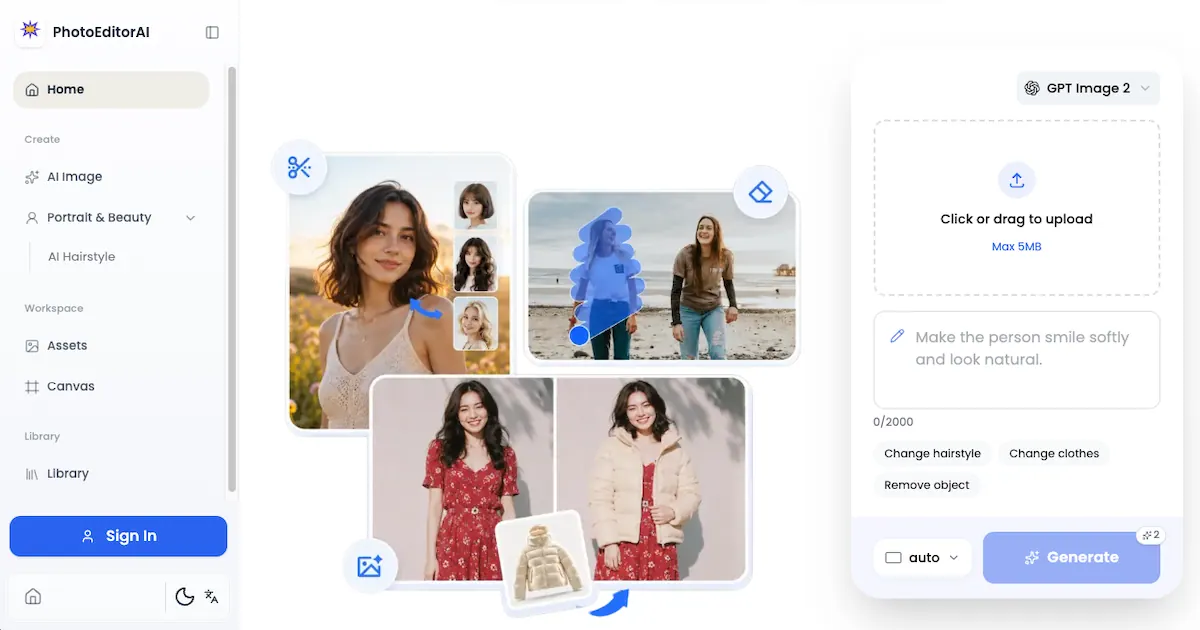
What does PhotoEditorAI do?
PhotoEditorAI is a free AI photo editor online for quick, professional-looking edits. Upload any photo, describe the change you want in plain words, and generate the result in seconds—no sign-up, downloads, or credit card required.
Use it to change hairstyle or clothes, remove objects, and create typography that blends naturally into the scene. The editor handles masking, lighting, edge detection, and other technical details behind the scenes so you don’t need manual tools.
It’s also useful for creative style transfer—upload a reference image (like a mood board or artwork) to recreate your photo with matching colors, textures, and artistic tones. For consistent creative projects, it aims to keep a subject’s face structure and body proportions stable across edits.
Is PhotoEditorAI really free to use?
Yes—PhotoEditorAI is available as a free online AI photo editor with no credit card, downloads, or waitlist.
Do I need to sign up before I can edit photos?
No sign-up is needed. You can upload your image and start editing without creating an account.
What photo formats and size limits are supported?
Upload JPG, PNG, or WebP images up to 20MB. The page also notes a 5MB max upload limit in the upload panel.
What kinds of edits can I request in plain English?
You can request changes like removing objects, changing hairstyle or clothes, swapping backgrounds, adjusting lighting, and applying creative style transfer using a reference image.
Do I need any photo editing experience or manual masking tools?
No. The editor is designed to work from natural-language prompts, handling masking and technical details automatically.
How do I turn the result into something usable for social or product content?
You can add captions, logos, or watermarks that match the scene’s lighting and perspective, and download the edited image in high resolution for sharing.
This listing is claimed
Own PhotoEditorAI? Sign in with the email used to claim it to manage this listing, or upgrade to Pro for featured-first placement and a newsletter feature.