
File To Prompt
No longer active
AI Text Generator
The AI text generator for effortless content creation. Instantly generate text with prompt and file upload.
File To Prompt is no longer available
- Listed
- Aug 4, 2023
- Shut down
- Feb 2, 2024
Promoted
 KurodyneSell the tools from your AI side projects. Listing is free.
 Sidrune AI85% off. Stable Claude API for agent developers. Pay as you go. Invoices & refunds available.
 Pixmax.aiPixmax.ai is an all-in-one AI workspace for videos, visual stories, and marketing content.
 RewindType any X/Twitter handle. Get their year back as a narrated video story. Then ask it anything.
 SEOify - Improve your SEO & rankingsBuild links to rank in Google. Improve your DR with links you can start building now.Advertise here270,000+ people visit Dang.ai every month.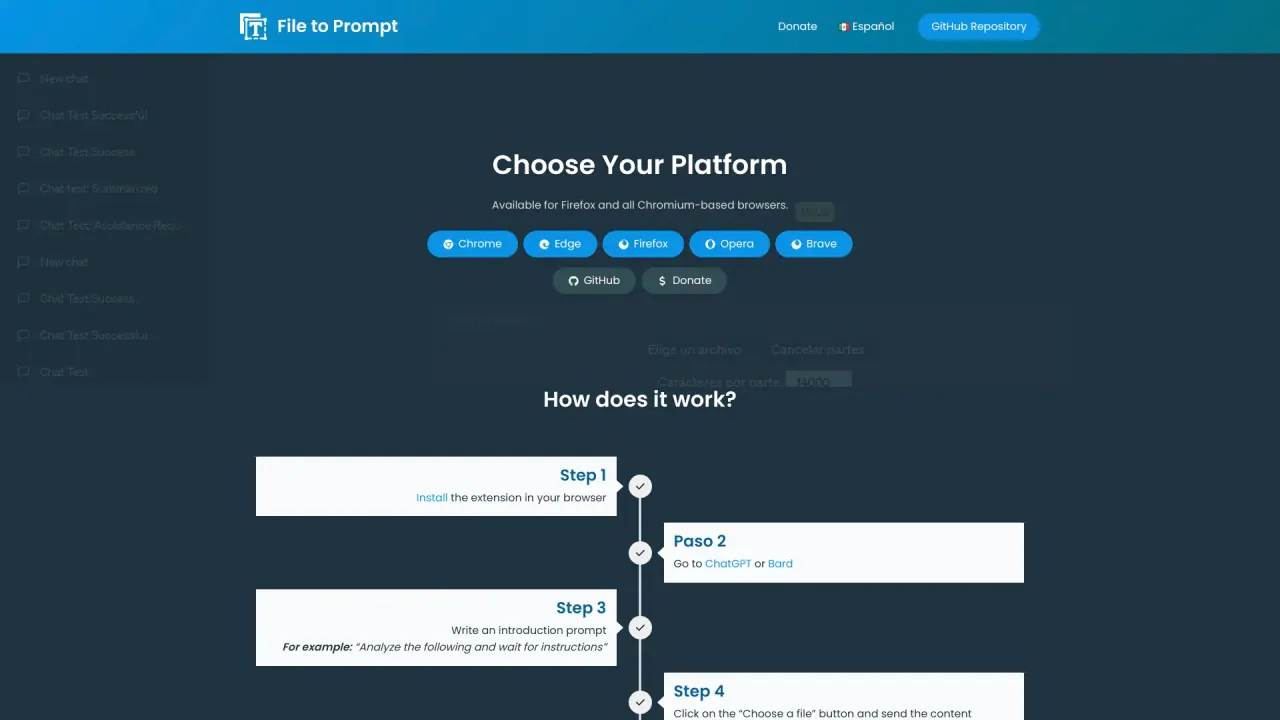
What does File To Prompt do?
What is filetoprompt.com?
File to Prompt is a browser extension that facilitates the use of local files as text prompts for AI models, including OpenAI ChatGPT, Bing Chat, and Google Bard. It enables users to select files in formats such as PDF, Word, Excel, and TXT, and send them directly to these AI models. The extension also divides large files into smaller, more manageable segments to ensure efficient processing.
How does filetoprompt.com work?
File to Prompt streamlines the process of using local files as prompts for AI models. Here's how it works:
- Install the Extension: Begin by installing the File to Prompt extension in your browser.
- Select a File: Choose a local file, such as a PDF, Word document, Excel spreadsheet, or text file, to use as a prompt.
- Send the Prompt: The extension splits large files into smaller, manageable segments and sends them to AI models like OpenAI ChatGPT, Bing Chat, and Google Bard.
- This allows you to quickly use file content for AI interactions without the need to manually copy and paste text.
What are the benefits of filetoprompt.com?
File to Prompt provides several advantages for users interacting with AI models like ChatGPT, Bing Chat, and Google Bard:
- Simplifies the Process: It removes the need for manual copying and pasting of text, making it easier to use local files as prompts.
- Supports Multiple Formats: Users can upload files in formats such as PDF, Word, Excel, and TXT.
- Text Segmentation: The extension divides large files into manageable segments for more efficient processing.
- Enhanced Comprehension: By sending content in smaller chunks, it helps AI models better understand and respond to the text.
- Time-Saving: It enhances efficiency and productivity by streamlining the process of uploading file content to AI models.
- Reduces Errors: It minimizes the potential for errors that can arise from manually entering text.
What are the limitations of filetoprompt.com?
While File to Prompt offers many benefits, it also has some limitations:
- File Size Limitations: There may be restrictions on the size of files that can be processed, which could be an issue for very large documents.
- Format Compatibility: Although it supports common formats like PDF, Word, Excel, and TXT, it may not be compatible with all file types or proprietary formats.
- Segmentation Issues: The process of breaking down large files into segments may sometimes result in a loss of context or coherence in the text prompts.
- Browser Dependency: As a browser extension, it requires a compatible browser and might not work seamlessly across all browsers.
- Privacy Concerns: Uploading files to an external service poses potential risks to data privacy, so users must ensure they trust the service.
How do I sign up for filetoprompt.com?
To sign up for File to Prompt, follow these steps:
- Visit the Extension Page: Go to the File to Prompt page on Obt.ai.
- Install the Extension: The extension is available for Firefox and Chromium-based browsers (such as Chrome, Edge, Opera, and Brave). Click the install button for your browser.
- Enable the Extension: After installation, enable the extension in your browser settings if needed.
- Navigate to AI Platforms: Open platforms like ChatGPT, Bing Chat, or Google Bard.
- Upload Files: Use the File to Prompt extension to select and upload your local files as text prompts.